Versions Compared

Key

  • This line was added.
  • This line was removed.
  • Formatting was changed.

...

Anchor
0022_SalesPerCustomer
Anchor
0022_SalesPerCustomer_2

Expand
title0022_SalesPerCustomer

Description:

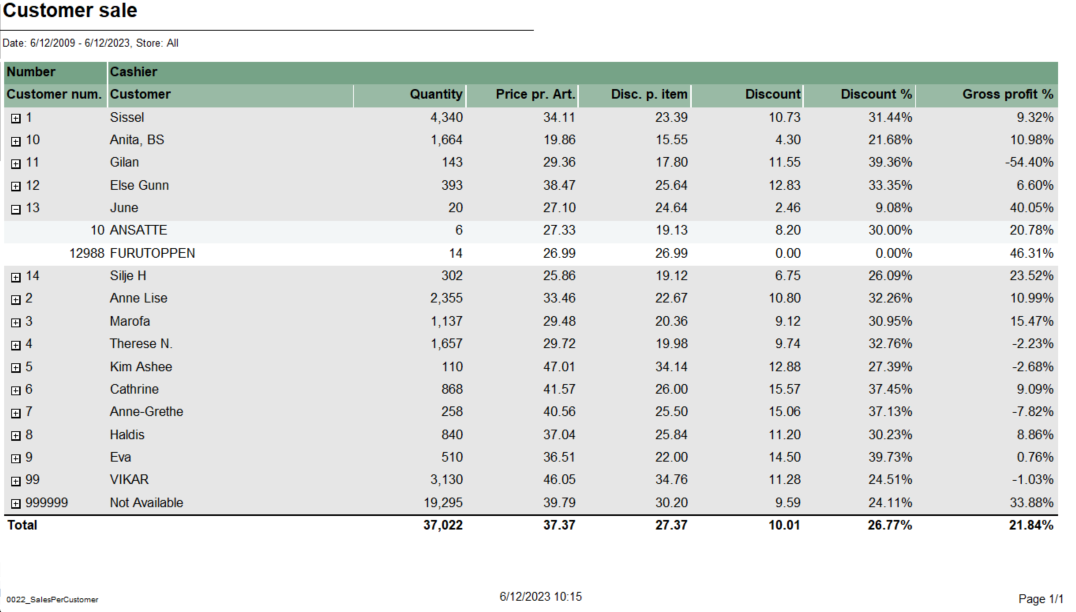
Report lists sales per customer.

Selections:

  • Date from - Default today
  • Date to - Default today
  • Store - Default all

Output:

  • Summary totals at the end of new hierarchy level for cashier.
  • Report has a total summary at the end of table for all cashiers.

Columns:

Customer number

Number - Operator number

Cashier - Cashier name

Customer - Customer name

Quantity

Price pr. Art. - Price per article

Disc. p. item - Discount per item

Discount

Discount % - Discount percentage

Gross profit % - Gross profit percentage

Hidden parametes:

  • pCustomer - parameter takes selected customers and shows sales for them ( it expects existing customers; version _2 removes leading '0's from CW passed parameters)

Source:

  • Lindbak POS Reporting Cube (OLAP)


...

Expand
title0759_SalesAnalysisWithComparisonAndDrilldown

CO-211507 / RTC-45144

Updated: 

Image Added

Description:

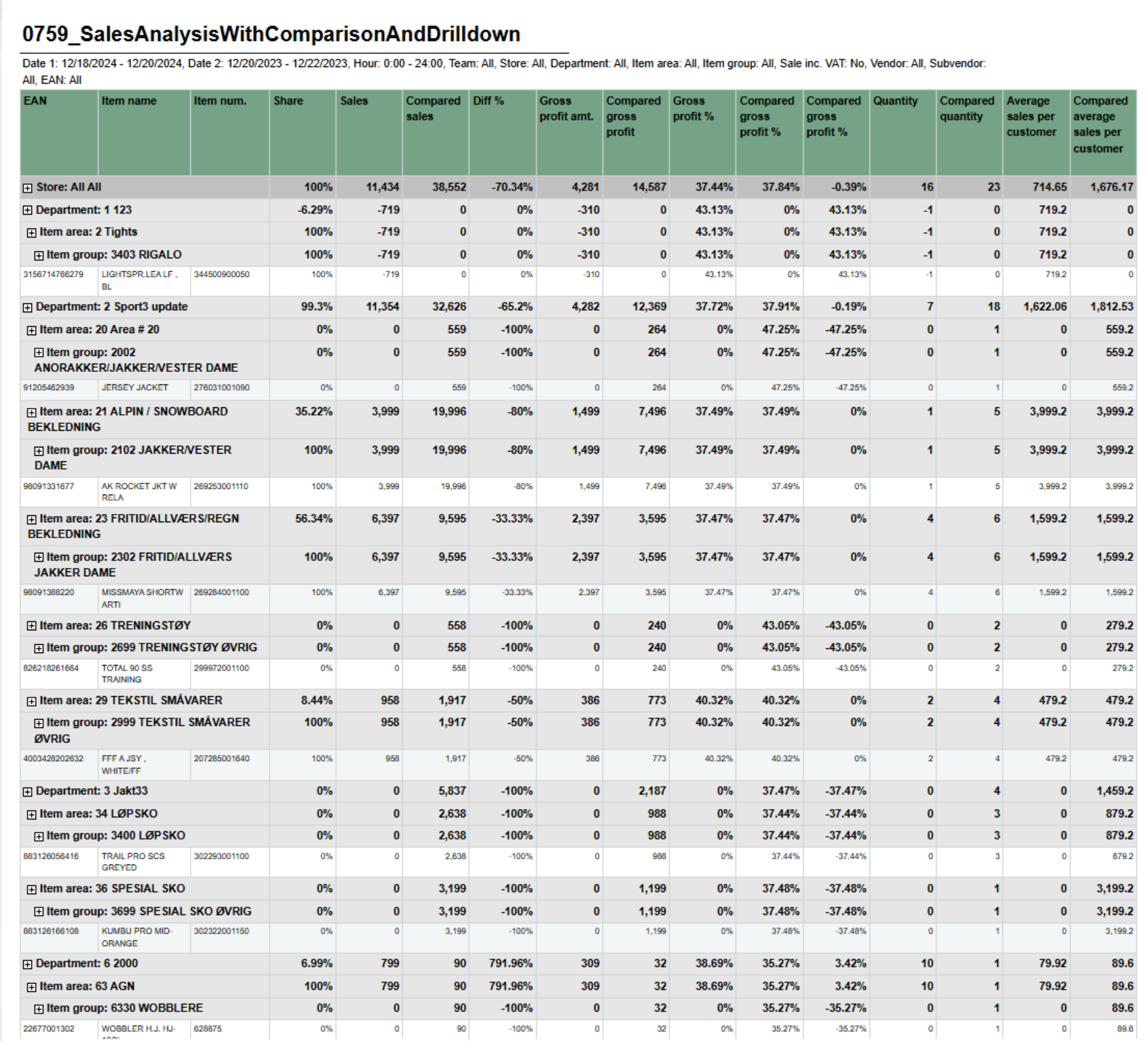
Report shows sales statistics in a hierarchy from store to department, item area, item group and item. Report show statistics for all selected stores and a total page for all selected store.


Selections:


  • Date from – Default today
  • Date to – Default today
  • Compare date from – Default last year from today
  • Compare dat to – Default last year from today
  • Hour from – Default 0:00
  • Hour to – Default 24:00
  • Team – Default all
  • Stores – Default all
  • Department – Default all
  • Article area – Default all
  • Article group – Default all
  • Vendor – Default all
  • Subvendor – Default all
  • EAN list  - Default empty
  • Include VAT – Default false
  • Exclude groups  - Default false
  • Excluded groups – Default groups 2 and 92.  Appears when Exclude groups is switched to true

Output:

One line per item with the hierarchy from store, department, item area and item group.


Columns:

  • EAN - Shows the entire hierchy down to EAN
  • Item name - Item name
  • Item num. - Item number
  • Share - Percentage share of sales
  • Sales - Sales amount
  • Compared ex. VAT – Compared sales excluding VAT
  • Diff % - Difference percentage between sales and compared sales
  • Gross profit amt. – Gross profit amount Compared gross profit
  • Gross profit % - Gross profit percentage
  • Compared gross profit % - Compared gross profit percentage
  • Diff gr. prof. %-units percentage points – Difference gross profit percentage in unitspercentage points
  • Quantity
  • Compared quantity
  • Diff % - Difference percentage between quantity and compared quantity
  • Average sales per customer inc. VAT – Average sales per customer including VAT
  • Compared average sales per customer inc. VAT – Compared average sales per customer including VAT


Hidden parameters:

  • pExcludedGroupsList – Report contain hidden parameter with selected article groups to be exluded by default. This parameter and pExcludedGroups will not work until parameter pExludeGroups will be set as True by user.


Source:

  • Lindbak POS Reporting Cube (OLAP)
  • Lindbak POS Reporting DW

...

Anchor
8013_CustomerSalesWithoutPrices
Anchor
8013_CustomerSalesWithoutPrices_2

Expand
title8013_CustomerSalesWithoutPrices

Description:

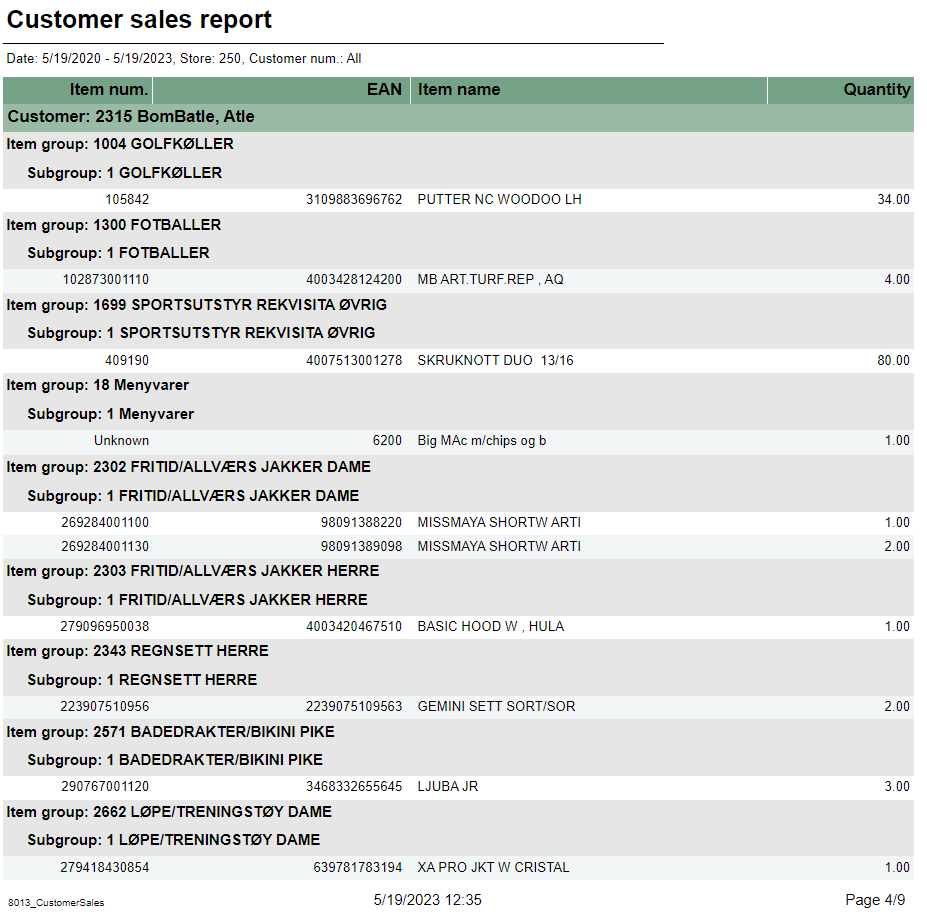
Report lists customer sales report without prices.

Selections:

  • Date from – Default today
  • Date to – Default today
  • Customer – Default all ( it expects existing customers; version _2 removes leading '0's from CW passed parameters)
  • Store – Default select a single store

Output:

Report shows table with customer sales period. For each customer, item groups and subgroup are shown.

Columns:

  • Item num. – Item number
  • EAN
  • Item name
  • Quantity

Source:

  • Lindbak POS Reporting Cube (OLAP)


...