
1. Overview
Purpose
This project automates API testing using Postman collections, executed through GitHub Actions CI/CD pipelines with the following capabilities:
- Execute Postman collections automatically
- Support multiple environments (dev / test / stage)
- Secure authentication using Azure AD OAuth2
- Dynamic runtime parameters
- Automated reporting using Allure Reports
- Hosting execution reports on GitHub Pages
2. Technology Stack
Repository link: EG-A-S/EGZP-Automation-Testing: Test repo for EGZP PartnerPortal
Component | Technology |
API Testing Tool | Postman Collections |
Execution Engine | Postman CLI & Newman |
CI/CD Platform | GitHub Actions |
Authentication | Azure AD Client Credentials |
Reporting | Allure Reports |
Environment Config | Postman Environment JSON |
Scripting | Shell scripts (Bash) |
3. Project Structure
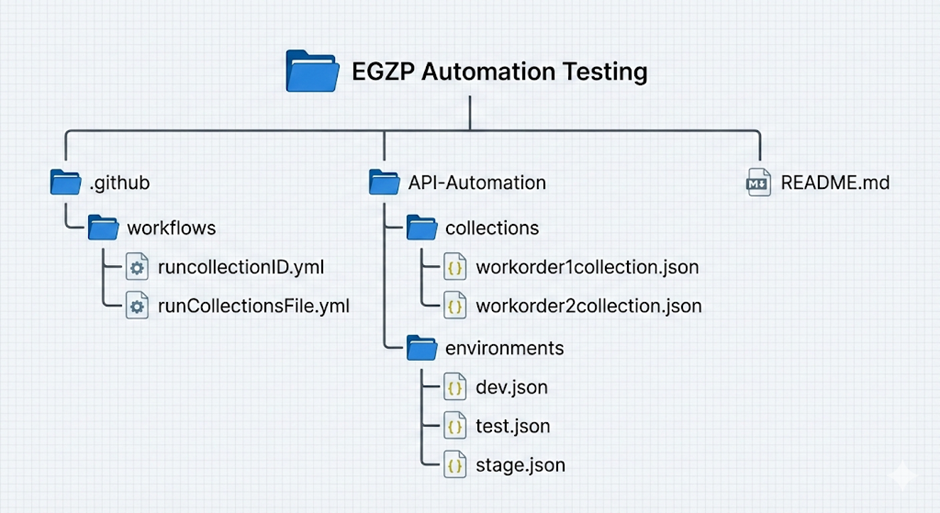
Folder Explanation
Location | Purpose |
.github/workflows/ | CI/CD pipeline definitions |
API-Automation/collections/ | Exported Postman collection JSON files |
API-Automation/environments/ | Environment variable files |
runcollectionID.yml | Execute cloud collection using ID |
runCollectionsFile.yml | Execute local JSON collections with reporting |
4. Authentication Mechanism
4.1 Security Implementation
Both workflows now include Azure AD Authentication using:
- OAuth2 Client Credentials Flow
- Secure GitHub Secrets
- Runtime Bearer Token generation
4.2 Secrets Required
The following secrets must be configured in GitHub Repository:
Secret Name | Purpose |
POSTMAN_API_KEY | Authenticate Postman CLI |
AZURE_TENANT_ID | Azure AD Tenant |
AZURE_CLIENT_ID | Service Principal ID |
AZURE_CLIENT_SECRET | Service Principal Secret |
AZURE_SCOPE | API scope for token |
4.3 Token Flow
- Workflow requests Azure AD token
- Token is injected into Postman run as: bearerToken
This token is then used by API requests inside Postman collections.
5. GitHub Workflows
The project contains two workflows for different execution scenarios.
5.1 Workflow 1 – runcollectionID.yml
Name: Run Workorder Collections with ID
Purpose: Runs a Postman collection directly from Postman Cloud using:
- Collection ID
- Selected environment
- Azure AD authentication
- Runtime variables
Trigger Type
- Manually triggered via workflow_dispatch
Input Parameters
Parameter | Description |
environment | dev / test / stage |
CollectionID | Postman Cloud Collection ID |
Contactperson | Custom runtime variable |
ContractorID | Custom runtime variable |
Execution Steps
- Checkout repository
- Install Postman CLI
- Login to Postman
- Fetch Azure AD Access Token
- Debug input values
- Execute collection with token
Token Generation Step
The workflow securely calls Azure AD:
curl -X POST https://login.microsoftonline.com/<TENANT>/oauth2/v2.0/token
- Retrieves access token
- Stores it in GitHub environment variable
- Fails pipeline if token cannot be retrieved
Key Features
- Cloud-based collection execution
- Secure Azure AD authentication
- Dynamic input support
- Ideal for quick on-demand runs
When to Use
- For ad-hoc executions
- For debugging specific collections
5.2 Workflow 2 – runCollectionsFile.yml
Name: Run Workorder Collections with JSON File
Purpose: Executes Postman collections stored in repository and generates:
- Allure execution reports
- Hosted test results
- Historical test evidence
Trigger
- Manual trigger via GitHub Actions UI
Input Parameters
Parameter | Description |
environment | dev / test / stage |
Collectionfile | Collection JSON file name |
Contactperson | Runtime variable |
ContractorID | Runtime variable |
Execution Flow
Publish to GitHub Pages
Reports are deployed automatically using:
peaceiris/actions-gh-pages@v3
Benefits of this Workflow
- Fully automated API validation
- Visual execution reports
- Secure authentication
- Environment flexibility
- Zero local setup required
6. Environment Management
Available Environments
Located at: API-Automation/environments/
Supported:
- dev.json
- test.json
- stage.json
These files contain:
- Base URLs
- API configuration
- Default variables
Authentication token is NOT stored here – it is injected dynamically for security.
7. How to Add New Collections
To onboard a new Postman collection:
- Export from Postman
- Place in: API-Automation/collections/
- Ensure JSON contains: ".info._postman_id"
- Run using: Run Workorder Collections with JSON File workflow
No pipeline changes required.
8. How to Execute Tests from GitHub
Steps:
- Go to GitHub Repository
- Open "Actions" tab
- Choose workflow:
- Run Workorder Collections with ID
OR
- Run Workorder Collections with JSON File
- Click "Run Workflow"
- Provide required inputs
- View execution logs and report
- Reporting System
Tool Used
- Allure Reports
What It Provides
- Pass/Fail dashboard
- API request logs
- Execution history
- Shareable HTML reports
9. Hosting
Reports are automatically published to:
https://eg-a-s.github.io/EGZP-Automation-Testing/
10. Security Best Practices
- No tokens stored in code
- All credentials in GitHub Secrets
- Azure AD token generated per run
- Short-lived bearer tokens
- No sensitive data in environment files