
Status: Proof of Concept · Presented: November 5, 2025 · Branch: users/prnag/chat-assistant-dev (repo https://github.com/EG-A-S/egu-partnerportal/tree/users/prnag/chat-assistant-dev) · Ticket: [EGU-2282] Exploring AI Chat Assistant in Zynergy Partners - EG A/S
Author: Pragnya Nagure, Team Nova
Purpose of this page: Document what was built, explain the underlying RAG pattern, and serve as a reference for future chat/AI-assistant implementations in the platform.
1. Overview
Luma is an AI-powered chat assistant embedded in the Zynergy Partners Application that answers questions about work orders and platform features using natural language, in English, Danish, or Swedish. It combines live database queries, indexed documentation, and page-level context to generate grounded answers via Azure OpenAI (GPT-4o) — rather than relying on the model's general knowledge alone.
This was built as a proof of concept to validate the approach; it is not yet production hardened. The goal of this page is to capture both the concept (so teams can apply the same pattern) and the concrete implementation (so this POC can be extended rather than rebuilt from scratch).
2. Why This Matters
For users: instant answers instead of support tickets, natural-language search instead of filters, multilingual, available on every page.
For the business: deflects repetitive support requests, surfaces what users are actually struggling to find, and demonstrates a reusable pattern for adding AI assistance to other parts of the platform.
3. Concept: What is RAG?
Retrieval-Augmented Generation is the core pattern behind Luma, and the one worth reusing elsewhere:
- Retrieve — find relevant information from your own systems (database, documents) instead of trusting the model's training data
- Augment — inject that retrieved information into the prompt as context
- Generate — the LLM writes a response grounded in that context, not just general knowledge
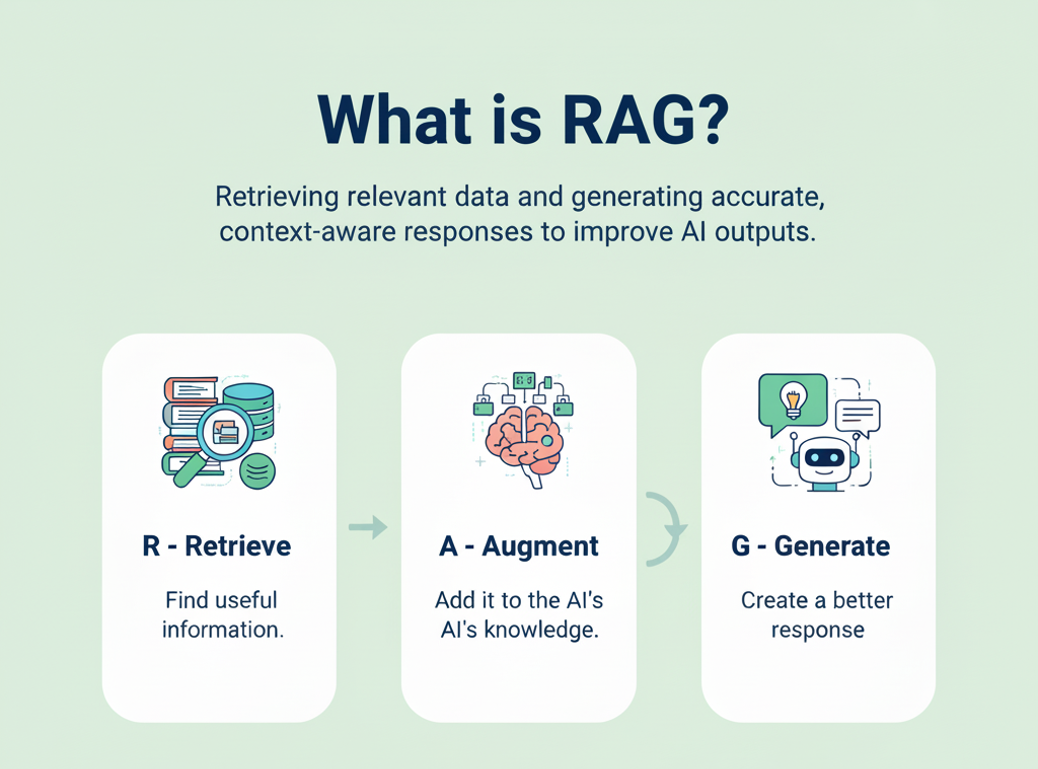
This matters because it lets a general-purpose model like GPT-4o answer accurately about private, current data (this user's work orders, this platform's release notes) that it was never trained on.
The three data sources Luma retrieves from:
| Source | What it is | How it's retrieved in this POC |
|---|---|---|
| Live Data | Work order records, scoped by role/permissions | EF Core query against Azure SQL, reusing the existing IWorkOrderApiService |
| Static data | User Manuals, release notes, FAQs | Indexed in Azure AI Search, queried via keyword search |
| Frontend context | Current page/section the user is viewing | Passed from the Blazor client on each request |
4. Technical Architecture
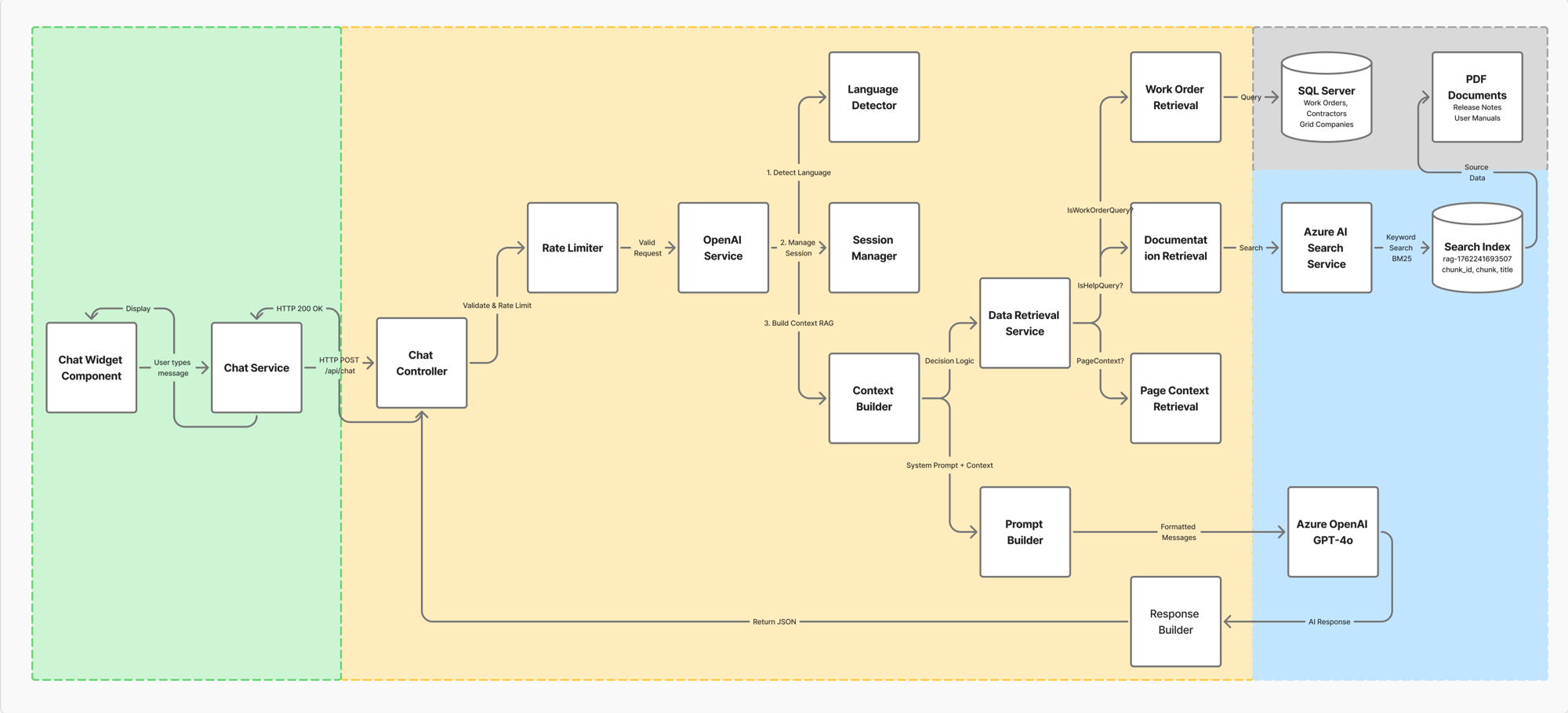
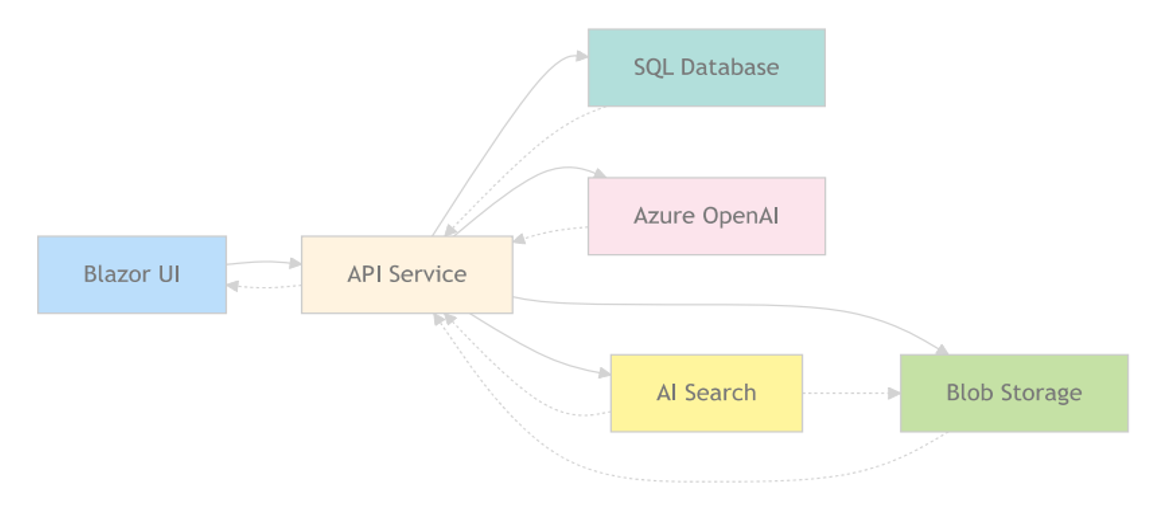
Request flow:
- Chat Widget (Blazor, MudBlazor) → user sends a message → HttpClient.PostAsJsonAsync("api/chat", ...)
- ChatController → rate limiter (in-memory sliding window, 10 req/min/user) → OpenAIService
- OpenAIService orchestrates: detect language → load conversation history → build RAG context → build system prompt → call GPT-4o → persist turn → return response
- DataRetrievalService decides what to retrieve based on the query: work-order data, documentation, or page context - and enforces role-based filtering (ApplicationAdmin / GridAdmin / GridUser / ContractorAdmin / ContractorUser) before returning data
- Azure AI Search returns matching documentation chunks (keyword search over an index built from PDFs/release notes/manuals)
- Everything is assembled into a prompt and sent to Azure OpenAI; the response streams back as JSON and renders in the chat widget
5. Technology Stack
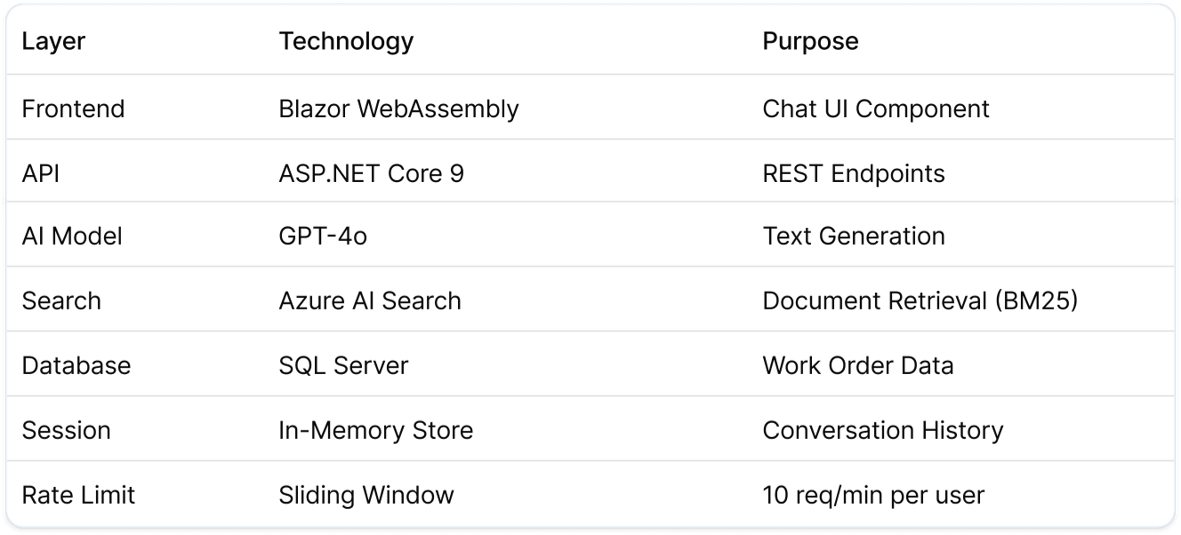
6. Feature Highlights (see recordings)
Each of these was demoed live on November 5, 2025:
- Role-Based Data Access
 role based.mp4
 - Azure AI Search (document retrieval)AISearchPrompts.mp4
- Multi-Language Support (EN/DA/SV)Multi language support.mp4
- Context Awareness - Page ContextPage context.mp4
- Context Awareness – Conversation Retentionconversation history.mp4
- Hybrid Queries (combining structured + unstructured retrieval)HybridQueries-1.mp4
7. POC Status & Known Limitations
Area | Limitation | Why it matters |
|---|---|---|
| Auth | Chat endpoint has no [Authorize]; UserId is client-supplied, not verified server-side | Role-based data filtering is real, but trusts a client-given ID - needs to read the user from the authenticated token instead. This chatbot implementation was done before the token authentication security implementation between services |
| Search | Only keyword search is active; vector search is implemented but unused | Semantic/vector search would likely improve retrieval quality for natural-language queries |
| Session management | DELETE api/chat/session/{id} is a stub | Sessions can't actually be cleared yet |
| Scalability | Rate limiter & session store are in-memory only | Won't work across multiple app instances; needs a distributed cache (e.g. Redis) before scaling out |
8. Recommendations for Future Implementations
Takeaways for building similar AI features on this platform:
- The RAG pattern here (role-scoped DB query + indexed doc search + page context → single prompt) is a reasonable template to reuse
- Keep retrieval and generation cleanly separated (as DataRetrievalService vs OpenAIService do) — makes it easier to swap search or model providers later
- Plan for distributed state (session, rate limiting) from the start if the feature will run on more than one instance
- Resolve the user identity from the authenticated request, not a client-supplied field, from day one
- Vector/semantic search is worth enabling for better natural-language matching — the plumbing already exists in this codebase, just needs wiring up
9. Appendix - API Reference
Method | Route | Notes |
|---|---|---|
| POST | api/chat | Main chat endpoint |
| GET | api/chat/status | Enabled flag, limits, supported languages |
| DELETE | api/chat/session/{sessionId} | Stub, not implemented |
| GET | api/chat/ratelimit/{userId} | Remaining requests for a user |
Config sections (in appsettings.Development.json): AzureOpenAI, AzureAISearch, ChatSettings - see repo for full key list.