Contents
ASPECT4 Finance Release Y26H2 includes a range of new features, enhancements, and corrections to reported issues.
SAF-T in Denmark
As part of the implementation of the Danish Bookkeeping Act, the Danish Business Authority requires digital bookkeeping systems to support SAF-T (Standard Audit File for Tax) as the standard format for exchanging bookkeeping data. SAF-T enables accounting and bookkeeping data to be shared in a consistent, structured, and machine-readable format between companies, authorities, and other business partners.
With this release, ASPECT4 Finance has been prepared for the latest Danish SAF-T requirements. The solution supports the Danish Business Authority’s public standard chart of accounts and standard VAT codes, which form the basis for generating and exchanging SAF-T data. The standard chart of accounts can be implemented directly or by mapping the company’s own accounts to the public standard chart of accounts.
The Danish Business Authority has published SAF-T version 2.0, which registered digital bookkeeping systems must support from 1 January 2027. The new version includes requirements for exchanging transaction-level bookkeeping data, mandatory master data, ledger entries, and a range of conditionally mandatory information. The purpose is to strengthen data sharing, automation, and future reporting to public authorities.
Companies are advised to ensure that their chart of accounts and VAT codes in ASPECT4 Finance are mapped to the current versions of the Danish Business Authority’s standard chart of accounts and standard VAT codes to support accurate SAF-T reporting and future digital data sharing.
Sources: The Danish Business Authority’s guidance on the standard chart of accounts and SAF-T (updated 18 June 2026), and information about SAF-T version 2.0 (10 February 2026).
E-invoices via NemHandel
As a result of the Danish Business Authority’s requirements for digital bookkeeping systems, companies must be able to receive electronic invoices via NemHandel in the standardised OIOUBL and Peppol BIS formats. The solution supports these requirements and enables e-invoices to be received and processed automatically, contributing to more efficient digital handling of incoming invoices.
Source: NemHandel - shared digital infrastructure | erhvervsstyrelsen.dk
Documentation of bookkeeping procedures
The Danish Bookkeeping Act requires Danish companies to describe their bookkeeping procedures. This release adds a template that companies can use to document their bookkeeping processes and support compliance with statutory requirements.
XML payments - structured addresses
To meet the banks’ requirements for structured address information in ISO 20022 XML payment files, the handling of vendor addresses has been enhanced. The requirement takes effect on 16 November 2026. ASPECT4 Finance supports the structuring of address information such as street name, postal code, and city in a hybrid format.
All new features, quality improvements, and corrections are described at application and task level in this document.
ASPECT4 Finance release Y26H2 indeholder en række nyheder, forbedringer og rettelser af uhensigtsmæssigheder.
Nye funktioner
| Labels | Client Release Notes | Key |
|---|---|---|
| 1120 | To link a general ledger account to an alternative account Trailer texts have been added to several fields. An option has been added to display only accounts with account level 9.
| A4-42777 |
| 1171 1479 | Danish SAF-T reporting - version 2.0 SAF-T (Standard Audit File for Tax) is a standardised format for exchanging transaction-level bookkeeping and accounting data between companies, systems, and authorities. In Denmark, SAF-T 2.0 is based on the Danish Bookkeeping Act and supports more flexible and consistent sharing of financial data. The report contains structured bookkeeping data and enables the exchange of detailed transactions for purposes such as audit, reporting, and data sharing with public authorities. The report contains detailed transaction-level data and associated master data, including: - Chart of accounts and general ledger entries - Customer and vendor data - VAT information and VAT codes Effective date of SAF-T 2.0 in Denmark SAF-T version 2.0 must be supported by all registered digital bookkeeping systems from 1 January 2027. | A4-38227 |
| 1211 | Common entry The application has been discontinued. Use the dedicated applications for transaction entry instead: “Pre-registration” (1241) “Voucher Registration” (1242) “A/R settlement” (2107) “A/P settlement” (3107) “Approve and post invoice” (3205) “Fixed asset entries without integration” (4220) | A4-40224 |
| 1221 1962 Budgetinterface | 12-month budget report - export to Excel send via email The “12-month budget report” application (1962) now supports output to an Excel-file that can subsequently be sent directly by email. This provides more flexible handling and sharing of budget reports.
Budget transaction interface A new ABC document has been developed that enables budget transactions to be imported from an Excel file to update budget data in ASPECT4 Finance. The solution supports more efficient maintenance and updating of budgets using spreadsheets as the data source.
Update budget entries in ASPECT4 Finance The “Budget transactions for ASPECT4 Finance” application (1221) supports the receipt, validation, and updating of budget entries received through the budget interface. This provides an efficient and controlled process for loading budget data into ASPECT4 Finance. For further information, see the application description. | A4-17517 |
| 1256 | Retrieve exchange rates Exchange rates can be retrieved despite the additional XML validation. | A4-42348 |
| 1270 3207 | Closing periods for incoming invoices received via Next The “Last month-end closing date, vendor” in application 'Date limination' (1270) can now be used to close an accounting period for incoming invoices received in the “Scanned invoices” application (3207) via NEXT (API: EG3266RA). The enhancement makes it possible to prevent new invoices from being received in the closed period while work can continue on workflow coding and approval of vouchers from the previous month. In addition, the functionality in “Month-end closing via Job Scheduling” (1271) has been enhanced so that the date can be maintained automatically as part of the scheduled month-end closing process when it is run through the Job Scheduling System (0160). | A4-39303 |
| 1301 | Improved display of transaction details Trailer texts have been added to several fields when using the “Display transaction” function for general ledger, customer, vendor, and fixed asset transactions. This makes the displayed values easier to understand and improves usability when viewing entries. | A4-42882 |
| 1901 | Trial balance in Excel The spreadsheet now includes information about the current group and company, as well as the account group for the accounts. Use EG1901QD as the “Print query (report)” in the function/user permission for the “Trial balance” application (1901). | A4-41395 |
| 2107 3107 | Handling transaction texts during manual settlement A new application parameter has been added to “Customer settlement” (2107) for specifying a default text code that is automatically suggested when the application starts. If the parameter is not specified, text code 105 is used by default.
The handling of transaction texts in “A/R settlement” (2107) and “A/P settlement” (3107) has been improved. If a manual transaction text is entered, the selected text code is automatically removed so that the manual text is used for the transaction. | A4-40973 |
| 2107 3107 | Trailer texts Trailer texts have been added to several fields to provide better information and improve usability when registering incoming and outgoing payments. The following fields now have help text: - Voucher type - Customer/Vendor - Offset account code - Currency code - Dimensions | A4-42788 |
| 2111 3111 | Norwegian organisation number For Norwegian customers and vendors, it is now possible to look up organisation numbers in the Brønnøysund registers to validate them and ensure accurate company information. | A4-6333 |
| 2111 3111 | Postal code handling Postal code lookup by postal district/city has been improved in situations where the same postal code may be linked to several postal districts. This occurs, for example, in Germany, where a postal code does not always uniquely identify a single postal district. The change ensures accurate handling of the combination of country, postal code, and postal district during postal code lookup. | A4-33610 |
| 2111 3111 | Attachments Customer and vendor currency codes (ISO codes) can now be used as keywords when archiving in Attachments, providing greater flexibility in the archiving setup. | |
| 2213 3213 | Statement of account print code An option has been added to make it possible to change the print code that indicates whether a transaction has been printed on a statement of account. The function can be enabled through the application parameters for the relevant applications, so the print code can be corrected only when the option has been explicitly enabled.
| A4-42173 |
| 2250 2490 | Screen design The screen used to select a bank account has been updated. | A4-37884 |
| 2265 3265 | Receipt of payments via CAMT054 A new stylesheet has been developed for receiving and processing payments in CAMT054 format. The solution supports the import of bank transactions and efficient handling of incoming payments in ASPECT4 Finance. | A4-39185 |
| 2658 3658 | Display and Search The applications have been enhanced with options to display and search by Organisation number (field KDCIR) and Contact person (field KKONP). | A4-38381 |
| 2991 2992 2995 3991 3992 3993 | Total overdue amount The 'Customer balance list' (2991) and 'Vendor balance list' (3991) applications now include a column showing the total overdue amount. This provides a quicker overview of customers’ and vendors’ overdue balances. Design update The reports have been redesigned and are now presented in a more modern and consistent layout, improving readability and the overall user experience. | A4-41846 |
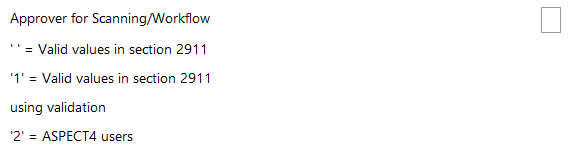
| 3111 | Approver lookup/list The application 'Vendor maintenance' (3111) has been enhanced with an option to define how field K10A1 (Approver) is validated when ASPECT4 OCR Scanning/Workflow is used. The application parameters can be used to select validation against: - Registered ASPECT4 users - Values created in General File section 2911 'Permitted field values' This provides greater flexibility in the setup of approver management and validation in the workflow process.
When validation against application 'ASPECT4 users' (3811) is used for field K10A1, a list lookup (F4) can be configured so users can easily select from the registered ASPECT4 users. | A4-40643 |
| 3211 3812 | Cleaning up posting proposal Application 'Incoming invoices' (3211) learns from previous registrations and stores account/dimension combinations that form the basis for subsequent posting suggestions. If an incorrect account is used only once, it is remembered permanently and continues to be suggested even after the original invoice has been corrected. The application 'Removing posting proposal' (3812) can be used to remove posting suggestions from 'Incoming invoices' (3211). | A4-32889 |
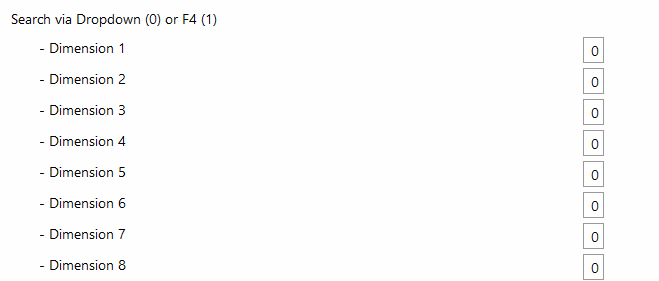
| 3211 | Drop-down-list for dimensions The application’s configuration options have been enhanced. An application parameter can now be used to define for each dimension whether values are selected from a list of current values or from a drop-down-list. This provides greater setup flexibility and more user-friendly entry. | A4-40493 |
| 3221 3222 3807 | Applications discontinued with ASPECT4 Finance Y26H2 Payable vendors (3807) Maintain EBF payment proposals (3221) Maintain payment proposals - selection (3222) | A4-42384 |
| 3438 | Vendor statement Vendor statements can now be printed using the application 'Vendor statement - ABC' (3438). The statement can be generated in the following formats: - Excel file for distribution by email - OIOUBL for sending via NemHandel Further information about functionality and setup is available in the application description and the application parameter description for “Vendor statement - ABC” (3438). | |
| 3443 | Headings The display of headings in the overview of open journals has been corrected so that they are now shown properly. | A4-43536 |
| 3473 | Vendor transactions The list now shows the vendor’s invoice number and the entry due date. This provides a better overview of the transactions displayed. | A4-42386 |
| 3844 | Application description The application description for 'Resend in case of error archiv' (3844) has been updated with improved and more precise documentation. | A4-41739 |
| History | Transaction texts The creation, modification, and deletion of transaction texts will now be logged, making it possible to track when and how transaction texts have been updated or removed. | A4-42574 |
| Import Vendor master data | Import and validation of vendor master data The function for importing, updating, and validating vendor master data through the ABC profile EG403.VENDOR.UPDATE has been improved. The change supports more efficient handling and maintenance of vendor master data in ASPECT4 Finance. | A4-41439 |
| Interface posting | Description The description of the application parameter for interface posting has been updated and clarified.
| A4-40975 |
| Interface posting | Validation of amounts and exchange rates on general ledger transactions Enhanced validation has been introduced for general ledger transactions imported through the interface to ASPECT4 Finance. When a transaction contains an amount in company currency, an amount in foreign currency, and an exchange rate, the values are automatically checked for consistency. The validation allows an exchange-rate deviation of up to 0.5, configured in general file section 1412 “Interface control”. If the initial validation cannot approve the values, a secondary check calculates the amount in company currency by multiplying the foreign-currency amount by the exchange rate. If the calculated amount, within the permitted exchange-rate deviation, matches the stated company-currency amount, the transaction is accepted and the stated amounts and exchange rate are used. | A4-41244 |
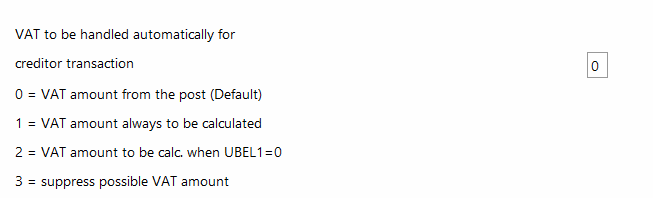
| Interface posting | Validation of customer and vendor invoices through the ASPECT4 Finance interface The validation of VAT amounts when posting customer and vendor invoices through the ASPECT4 Finance interface has been enhanced with a new application parameter. The parameter makes it possible to disable the existing validation that checks whether the VAT amount exceeds the invoice amount. The change supports scenarios in which invoices may contain a VAT amount greater than the invoice amount or where the VAT amount has the opposite sign to the invoice amount. The validation remains enabled by default.
| A4-42292 |
| Nemhandel e-invoice | Receive e-invoices ASPECT4 supports the receipt of electronic invoices via NemHandel in OIOUBL format. The functionality contributes to automated handling of incoming invoices and supports companies’ work with digital business documents. An invoice is received through an ABC document, which starts a process that handles: - Archiving the invoice against the vendor and voucher in ASPECT4 Attachments - Optional invoice matching in an ASPECT4 industry solution - Pre-registration/posting of the invoice - Optional initiation of an ASPECT4 Workflow for invoice approval | A4-38563 |
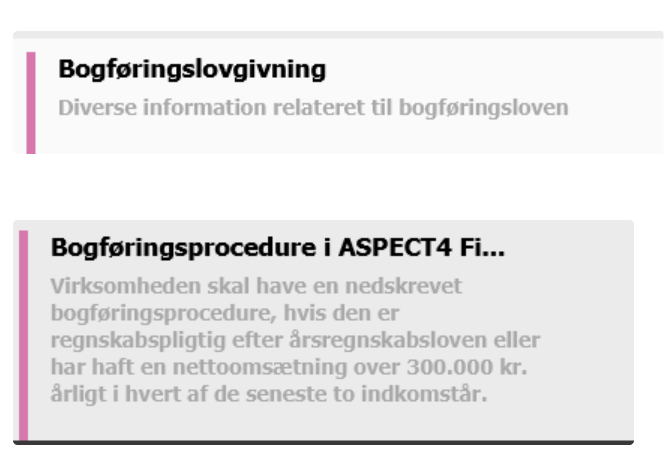
| Tutorials | Template for describing bookkeeping procedures A template has been created to support companies in documenting bookkeeping procedures in accordance with the Danish Bookkeeping Act. The template is available under Tutorials > Bookkeeping legislation with the function name BOGFPROCED and can be used as the basis for the company’s own description of its bookkeeping procedures.
As a general rule, the Danish Business Authority requires companies subject to the Danish Bookkeeping Act to have a written description of their bookkeeping procedures. According to the Danish Business Authority’s guidance, the description must at least cover: - How the company’s ongoing transactions are recorded - How the bookkeeping records are reconciled - How accounting records are stored securely - Who is responsible for the procedures The Danish Business Authority’s template is divided into three main areas: General information - CVR number - Responsible persons - Any external bookkeeper/auditor - Bookkeeping system - Chart of accounts Recording and reconciliation of transactions - Overview of significant transaction types - Recording procedure - Reconciliation procedure Storage and retrieval - Storage of accounting records - Secure storage - Retrieval of records for inspection or audit The description must be retained with the accounting records and updated when the procedures change. It does not have to be submitted to the Danish Business Authority but must be available in the event of an inspection. | A4-19609 |
| UDF | Payment terms text in the user’s language A new User Defined Function has been added that retrieves the payment terms text in the user’s language for use in QueryManager and elsewhere. Use the function as follows: PayTermText_1(group, company, payment terms) For further information, see the function description 'FINANCEUDF'. | A4-44072 |
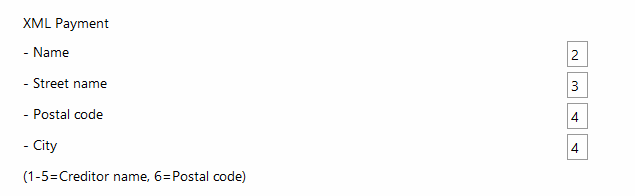
| XML-payment | Structured address information in XML payments in hybrid format To support the banks’ requirements for structured address information in payment files, the handling of address information in XML payments has been changed. Payee address information can now be generated in a hybrid format, ensuring that payment files comply with current ISO 20022 requirements and bank validation rules. If a city name cannot be found from the postal code, it is now retrieved from a defined address field in the vendor master data. The application application parameter for 'Maintain payment proposals' (3220) must specify which address fields contain the name, street name, postal code, and city. The change helps reduce the risk of rejected payments and ensures more consistent handling of payment information when XML payments are sent.
For further information about structured addresses, see the XMLPAYKRE function description. | A4-40825 |







Reported defects and issues
| Labels | Client Release Notes | Key |
|---|---|---|
| 1111 | Account groups When List (F4) is used in the Account group field, the available account groups are now listed correctly. | A4-41609 |
| 1131 | Display history When the the changes log for an individual VAT code is displayed, the data now remains on the screen when returning from the history information. | A4-42423 |
| 1242 | Accruals The screen is now displayed correctly when manual accrual entries are created. | A4-38984 |
| 1335 | Optimised search The search process has been optimised, resulting in faster retrieval of general ledger transactions. | A4-41378 |
| 1540 | General ledger chart of accounts for NEXT Workflow An issue with transferring general ledger chart-of-accounts information to NEXT Workflow has been corrected. General ledger accounts and dimension accounts are now transferred correctly to the workflow. | A4-41093 |
| 1640 | Correct requisition number for ASPECT4 TMS An issue with the transfer of requisition numbers to ASPECT4 TMS during posting and reposting via CHARTEQUE has been corrected. In some cases, the requisition number was transferred with an unwanted leading character. The requisition number is now transferred correctly to TMS, so only numeric values are sent to the REKVNR field. | A4-44351 |
| 1674 3207 | Automatic transfer of purchase order number for scanned vendor invoices This correction applies only to users of ASPECT4 Manufacturing. An issue with vendor invoices received from third-party scanning solutions through the API 'Vendor invoice scanning' (3266) has been corrected. The purchase order number is now transferred correctly to the associated vendor entry in field KREPSTT1.KPEXN5. The correction applies to all new transactions created after the correction has been implemented. | A4-40629 |
| 2111 3111 | Betalingsbetingelsestekst Der vises nu op til 40 tegn af betalingsbetingelsesteksten som trailertekst til debitors/kreditors betalingsbetingelse. | A4-39032 |
| 2111 | Forbedret navigation fra "Søg debitor" (2658) | A4-39034 |
| 2111 | Payment terms text Up to 40 characters of the payment terms text are now shown as trailer text for the customer’s/vendor’s payment terms. | |
| 2114 | Customer internet information The handling of internet information for customers has been improved. The information is now linked correctly to the individual customer in the relevant company. | A4-38566 |
| 2114 2115 3114 3115 | History of changed email addresses When an email address is changed, the original value is now written correctly in the history when the email address exceeds 50 characters. | A4-39682 |
| 2250 | SEPA Direct Debit Summation handling for SEPA Direct Debit has been improved. The number of invoices and the total collection amount are now totalled correctly by due date. | A4-40180 |
| 2265 3265 | Matching payments to customers Validation when matching payments to customers has been improved. The currency code is now checked correctly during matching. | A4-40681 |
| 2265 3265 | General ledger transaction texts for incoming payments The handling of transaction texts for customer payments has been improved. Correct transaction texts can now be assigned automatically to both general ledger transactions and associated offset transactions in accordance with the setup in general file section 2265 'A/R payments - setup'. If a payment transaction is split into two or more entries in application 'Receiving incoming payments' (2265/3265), after which one consolidated bank transaction is created for the payment, the defined text code is now used consistently to generate the text on the bank transaction.
| A4-41740 |
| 2265 3265 | Customer payments The following improvements have been implemented for customer payments: - Customer number 0 are now ignored during automatic payment matching, ensuring more precise matching. - If the bank supplies more unstructured payment information lines for the same payment, they are now combined correctly into a single payment information field in ASPECT4 without inserting extra spaces. - Information about links between payment lines and customer numbers is now stored and can be reused for future automatic matching of payments to customers. | A4-42245 |
| 2265 3265 | Handling dimensions when receiving customer payments Handling dimensions when receiving customer payments has been improved. The required dimensions are now assigned automatically to general ledger transactions based on the account’s dimension requirements and the setup in general file section 2266 'A/R payments - dimensions'. | A4-44477 |
| 2437 | Correct summation of rounded amounts The summation of goods receipts, triangular trade, and services has been improved. Totals are now calculated from the rounded amounts shown in the specification, ensuring consistency between the displayed entries and the totalled amounts. | A4-35576 |
| 2437 | Rounding Rounding of amounts has been standardized across the lists and data generated when the application is run. This ensures consistent display and calculation of amounts in the generated data set. | A4-39911 |
| 3207 | English translation The English application parameter texts have been updated and corrected so that they are now displayed with accurate translations in the user interface. | A4-42584 |
| 3207 | Description of application parameters The application parameter documentation has been expanded with a description of the “KID number on credit note” parameter. This makes the parameter’s purpose and use easier to understand during setup and maintenance. | A4-42586 |
| Interface posting | EU VAT The calculation and generation of EU VAT entries have been improved. The exchange rate registered on the associated customer or vendor transaction is now used, ensuring accurate calculation of EU VAT. | A4-38673 |
| Interface posting | Deleting vendor transactions in the ASPECT4 interface The deletion of vendor transactions from interface journals is now handled correctly. Deletion is limited to the relevant entries on the current voucher, which are then returned to the “Scanned invoices” application (3207). This applies to both scanned invoices and EDI invoices. | A4-38862 |
| Interface posting | Udkontering | A4-42802 |
| NO-XML-payments | Retursvar fra banken ved XML-betalinger i norske selskaber | A4-43064 |