
Chain Web v. 2.9.288
Released 16th of February 2021
Rounding in EHF files (RTC-9092)
The PayableAmountRounding field is saved in EHF files only when there is a rounding amount (different than 0).
Rounding of credit sale (RTC-7089)
In some instances, the rounding of items was wrongly calculated when creating a credit sale, causing a subtotal rounding of 0,01. This issue has been resolved.
Chain Web v. 2.9.285
Released 4th of December 2020
Don't allow creating new stocktaking if last stocktaking is not updated in Chain Classic (TFS: 189347)
Now the user will not be able to create a new stocktaking in Chain Web (also with the refreshed stock level for the assigned count lists) inside the same store, until the last POSLog related to previous stocktaking (previous stock results) will be processed/ updated in Chain Classic.
Related Chain Classic PBI with the requirements: Product Backlog Item 190077: 2.1.1: Sport1: Stocktaking: New proxy for checking that last stocktaking is finished.
Chain Web v. 2.9.284
Released 1st of December 2020
Search for active orders shows both active and cancelled orders (TFS: 186790)
The flag IsCancelled has been added to the response of the GetCustomerOrders3 method in CustomerOrder service. It shows if an order is cancelled or not.
Requirements: POS Services 7.76.03703!
Chain Web v. 2.9.283
Released 18th of November 2020
Improvements
Modules | Description |
|---|---|
Credit sale | Block "correction of credit sale" when original receipt was partly paid by another tender type (TFS: 169266) When credit sale contains other tender type than Credit, correction is not allowed. Dependencies to another products: POS WCF in version 3.0.0.12003 or 4.0.0.12002 or higher required. |
Invoice | EHFs rejected due to missing ref. number / ref. text (TFS: 188224) If a customer is changed to receive EHF invoices, after credit sale have been created, the reference number and text is set to 'None' when invoicing is done, so that the EHF won't fail due to missing input in these fields. |
Chain Web v. 2.9.280
Released 23rd of October 2020
SLA calculation
(TFS: 179569)
New methods are added to CustomerOrderDeliveryMethod:
DeliverySlaType
DeliveryHours: SomeNumber
DeliveryHours is a constant number of hours used to determine delivery time since send out.
By using DeliverySlaType method ( with different set value), it is possible to calculate the SLA date for order delivery.
It is possible to set for DeliverySlaType following values:
Today = 1,
Tomorrow = 2,
Days3to4 = 3,
Days3to10 = 4
When dispatch order is created, the calculated SLA date is stored in the DeliverySlaDate column in [Lindbak Retail].[CustomerOrder].[OrderDeliveryDetails] table.
Gift card number on item line in customer order
(TFS: 186006)
The gift card number is displayed on the order line, so the gift cards sold in an order can be identified.
Dependencies to another products:
POS Services in version 7.76.03505 or higher required.
Send gift card by email from item line in customer order
(TFS: 186007)
The gift card can be sent by email, from the order line view in a customer order.
Dependencies to another products:
POS Services in version 7.76.03505 or higher required.
See used and active coupons in POS
(Work ID: 179889)
Used and active EG digital coupons (and stamp card status) can be shown in POS. This makes is possible to inform about possible discounts and also to help the customer find out if a coupon was already used.
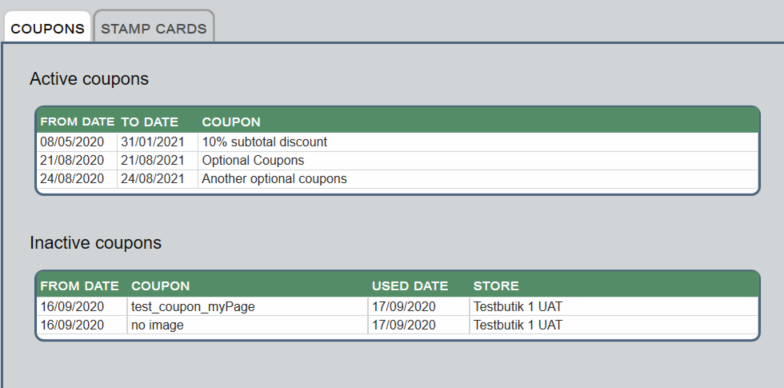
Chain Web version 2.9.271 or newer is required!
Price guarantee - accounting between business units
(TFS: 184327)
A new report is created which shows how much each business units owes each other, based on returns with reason code 6 (Price guarantee).
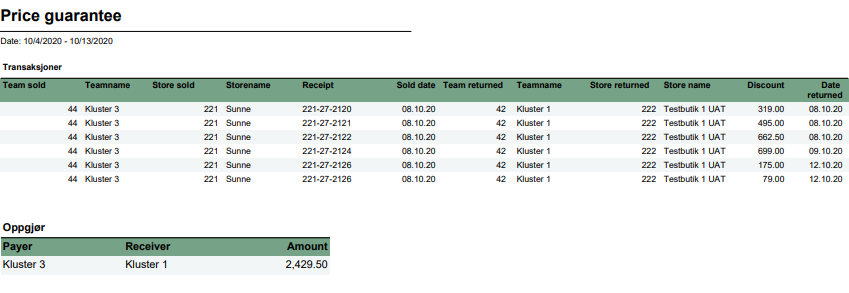
Business units are teams where team type is 1. To import team type from Chain we have created new package "TeamLC" which has to be enabled. This package runs within N-job.
For this report to work, one store can only be member of one business unit.
Example:
Store1 in Team1 sells item1 for 500,-
Item1 is returned with reason code 6 in Store2 in Team2. In same receipt same item is sold for 400,-
Report shows that Team1 owes Team2 100,-
Price guarantee | |
File name | 0115_PriceGuaranteeReconciliation.rdl |
Data source | Database “Lindbak POS Reporting DW” |
Selections | Comment |
Date from | Selection for sold date - default today |
Date to | Selection for sold date - default today |
Parameters: | |
pMainTeamTypeKey | Teamtypekey for business units- default 1. |
Columns for transactions | |
Team sold | Team number where item is sold |
Teamname | Team name where item is sold |
Store sold | Store number where item is sold |
Storename | Store name where item is sold |
Receipt | Receipt number where item is sold |
Sold date | Date when item is sold |
Team returned | Team number where item is returned |
Teamname | Team name where item is returned |
Store returned | Store number where item is returned |
Storename | Store name where item is returned |
Discount | Difference between returned price and sold price for same item. |
Date returned | Date when item is returned |
Columns for Settlement | |
Payer | Team who owes money |
Receiver | Team who receive money |
Amount | Amount |
Reporting on received deposit refund
(TFS: 188176, 187496)
We have adapted two settlement reports to support deposit refund as stock item
In report 0015 Store settlement, deposit refund section. Deposit refund received shows sale from item group indicated in parameter.
Changes are made in sub report 1005_subDepositREfund
In report 0709 Store settlement, statistics section. Deposit refund received shows sale from item group indicated in parameter.
Changes are made in sub report 1706_SubStatistics.
Report for free items
(TFS: 188574)
In report for free stamp card items (0152_FreeItemsFromStampCard) a new column: "Ordernumber" has been added, which shows supplier order number from article.
We have also added filter for store, EAN and order number.
Because of restrictions in Chain Web report viewer, we show max 20 store numbers in parameter list. If there are more stores selected, store list ends with ',...'
Max number can be changed in hidden parameter pParameterDisplayLimit
Requirements: Lindbak POS Reporting v. 64.
Redispatch Pay & Collect orders if it cannot be delivered
(TFS: 185988)
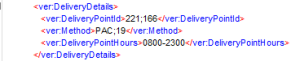
It is possible to redispatch Pay & Collect orders to desired store and with desired delivery method.
It is done by adding the next DeliveryPointId and Method in the POSLog:
Improvements
Modules | Description |
|---|---|
Cashier | Fields in Cashiers view should not be case sensitive (TFS: 166535) Search fields in Cashiers view are no longer case sensitive. |
Credit sales | View credit sales created by another user or from POS (TFS: 184581) To be able to edit credit sales created by another user or from POS, the user must have the access: "Edit credit sales". |
Customer | Invoice fee created for member with 0 credit (TFS: 183083) An Invoice fee receipt is created, regardless of the customer's credit limit. This can cause the credit limit to be exceeded by the invoice fee. |
Gift cards view | All column for owner email (TFS: 185904) A new column for 'Email' has been added to the Gift cards' grid. |
Homepage | Minor improvements (TFS: 181606) Swedish translations have been added for Default Settings component and the Change Settings component. Furthermore, margin settings have margin intervals on the same row with proper headers and more customer friendly translations. The Popup for comparison date has different margin colors compatible with settings to enable users to track stores or department performance in a better way. Department KIP in Homepage dashboard (TFS: 186140) 'Sales per Department' component displays a list of 1 to 8 department (according to user's settings) with their percentage performing values and appropriate margin colors (according to user's settings). Furthermore, the 'Sales per Department' component was expanded to view more details when comparing percentage values from the same date last year or day set by user itself. After clicking on a specific department more details displayed to the right in a a pop up window. |
Inventory control | Max 1000 items in counting Group (TFS: 176822) The maximum amount of items in count groups has been limited to 1000. It applies to both count group imported via Inventory Control integration and count groups created in Chain Web. |
Invoices | Electronic invoice should not contain an empty "Description" field (TFS: 179958) When the line note on the line in the order or credit sale only contains white spaces, then the description field will not be created for this line in the Electronic invoice xml file. This change is made to avoid sending an empty description field, which causes an error when validating the EHF invoice. Changes to the PDF Invoice and user interface (TFS: 185463) For Swedish stores, the invoice shows information about:
Sum total VAT amount on Invoice (TFS: 186891) The Invoice has a new field for the total VAT amount. |
Reporting | New colors in reports (TFS: 175400) Changed color scheme for graphs in all reports to match the new EG design. Discount quantity (TFS: 191692 In sub report 1406_subDiscounts. Number of discounts are changed from number of articles to number of receipts. Reporting on cancelled receipts (TFS: 187201) We have updated the way we report on cancelled receipts in some reports. Cancelled receipts now include receipts cancelled with status "DeletedFromUnfinishedReceipt". Following reports are changed: 0018_CashierStatistics_std |
Stocktaking | Permanent solution for saving model items (TFS: 182799) The process of resolving model number has been solved permanently. Previously, some customers had issues with saving model items in retail database during synchronization of items. Additionally, improved logging in case of failed events has been added, so problems in the future will be easier to identify. Virtual scroll in Archive view (TFS: 183194) When working in the stocktaking archive view the bottom scroll is improved. Previously, there was a visual error causing the scroll bar to not stay in the bottom of the screen. Completed date in stocktaking view (TFS 185122) The "Completed date" column has been added to the stocktaking grid in Overview tab and also to the grid in Stocktaking tab. Users no longer have to open each stocktaking to see the completed date. This change is implemented to make it easier to work with stocktaking. Item sync: Support comma and backslash in the 'error' file name (TFS: 185487) Comma as a first sign is supported in the decimal fields. The date format included in "error message" file name will always have the same format "yyyy-MM-dd" - e.g. Failed single from batch ItemChanged 2020-09-29.txt. This is changed to avoid item synchronization to fail due to poor data quality. Increase stability in count list import (TFS: 185489) When the count list contains an item which doesn't exist in Chain Web and was attempted added more than once - it will not stop the import of the whole count list. Information about the one failed item will be logged. Support deleting one EAN when item processing type = full (TFS: 185490) It is possible to delete just one EAN from a count lists, regardless of the parameter value for ModelItemsProcessingType. |
Store | Support hyphen in account number for Swedish customers (TFS: 186256) Hyphen in bank account number is supported. The account number can look like this: 123-4567. |
System | Team view in Chain Web (TFS: 178777) All stores that are part of a team are displayed in Chain Web Team menu. |
User | First/Last Name is not mandatory for Azure users (TFS: 172957) It is possible to create Azure User in Chain Web without First/Last Name, which is still mandatory for standard user. |