
Document status: RELEASED
Date:
Version Requirements for 2.9.250 is located on the menu to the left.
Highlights | |
|---|---|
Release version: 2.9.250  |
|
Homepage Dashboard
(TFS: 175763, 175988, 175995, 178289)
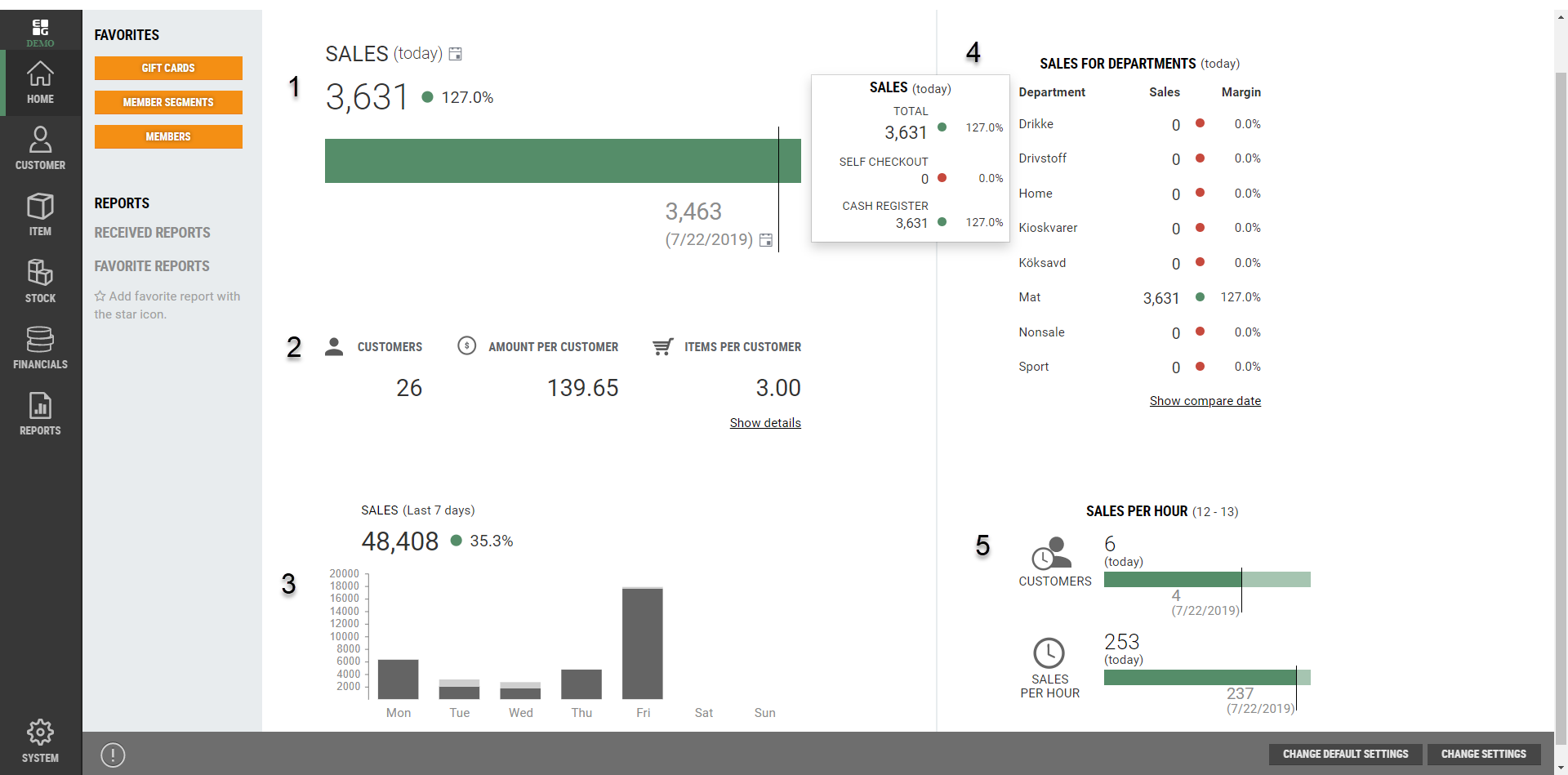
Introducing a brand new homepage dashboard. The dashboard gives the users a good overview of important sales statistics, both in realtime and in the past. The purpose of the dashboard is to easily allow retail chains to see up-to-date sales statistics and their overall performance. A HQ user will be able to view statistics from the perspective of one individual store, or all stores combined, whilst Store users can view the statictics based on the stores they have access to. The dashboard is split into 5 sections:
Comparison of sales today vs sales on the same weekday last year (by default). The comparison date can be changed manually by clicking the calendar icon. The “%” shows gross profit percentage for today’s sales.
Sales statistics related to customers. This section displays data such as:
Number of customers (transactions)
Average expenditure per customer
Average number of items purchased per customer
By clicking “Show details”, it is possible to view this data for self-checkout and cash registers separately.
Sales last seven days. Additionally, it will show the % gross profit for the sales this week.
Sales for Departments. This section shows sales per department. In the default settings (HQ user access) it is possible to adjust the margins and to decide which departments should be shown by default for all users. Individual users can adjust which departments should be shown for them.
Sales per hour. Shows number of customers in the last full hour and total sale amount.
All graphs can be clicked for more detailed information.
Change settings: 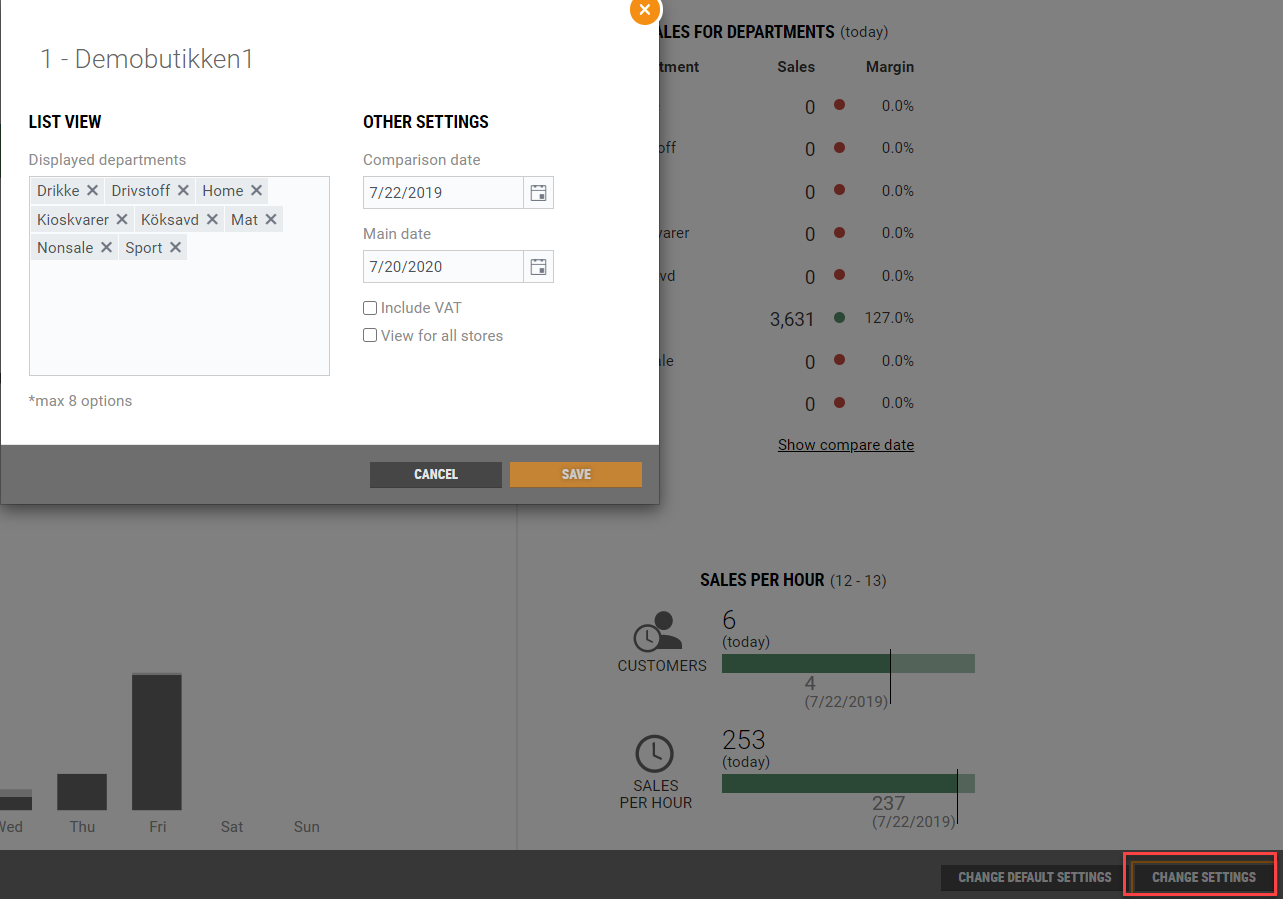 | Change default settings: 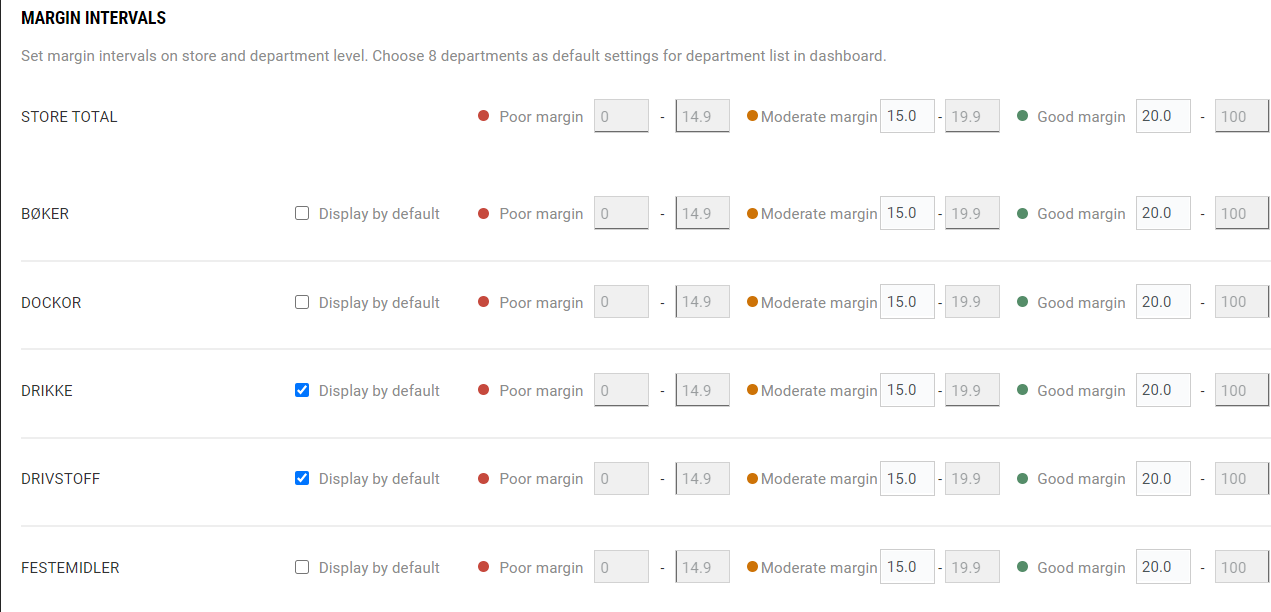 |
|---|
Change owner of gift card
(TFS: 176036, 176035, 176032, 175819)
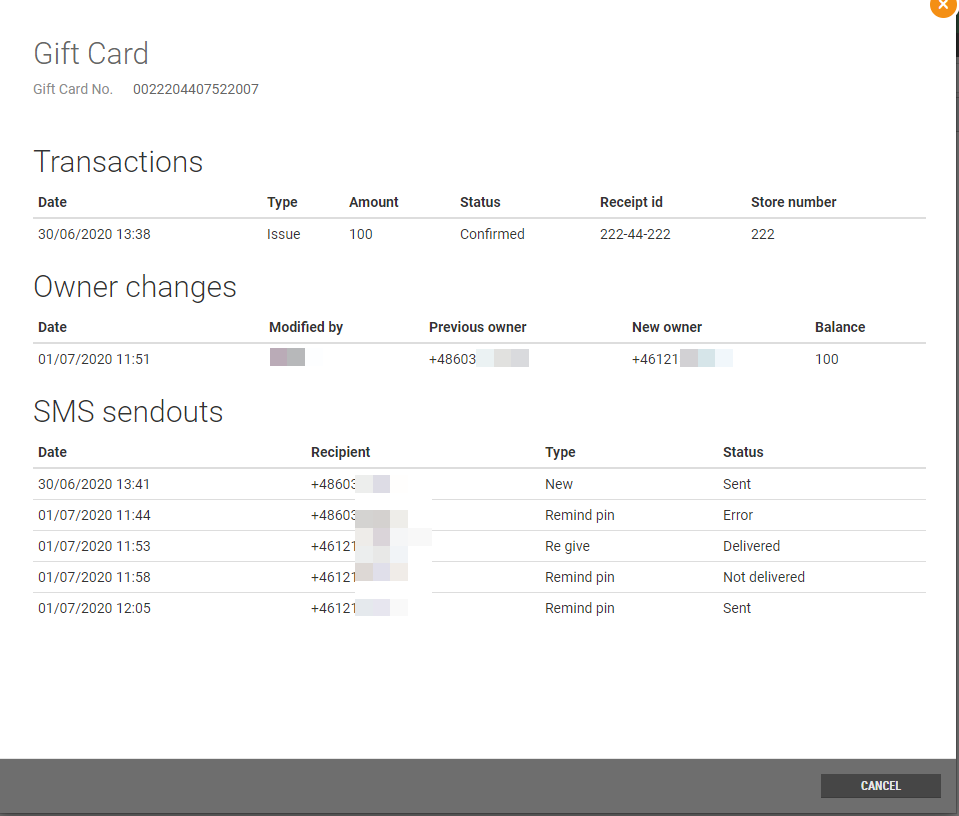
The existing functionality for reminding the customer of their PIN code has been reimplemented to use GiftCardService. All distributions of gift cards are displayed in the details of gift card in Chain Web, when clicking the “eye” icon. When a new gift card is purchased, it is required to be registered with a valid phone number, as the PIN code will be sent by SMS to the owner. Additionally, it is possible to give a gift card away to another owner, for example as a birthday present. When giving away a gift card it is important that the new owner’s phone number is registered on the gift card when giving it away, so that they will receive the PIN code on SMS. Changing the owner of a gift card can be done through the GiftcardService API in a 3rd party application or in Chain Web.

Requirements: |
|---|
|
|
|
Configuration regarding the content of the SMS sent to customers is configured in the integration platform. There are three SMS templates that can be configured, for three different scenarios:
“New giftcard”. When a new giftcard is sold, an SMS is sent to the owner with this template. The SMS can maximum contain 320 characters and it is possible to add a variable for the 4-digit PIN Code (this applies to all three templates).
“Re-give” giftcard. When an existing giftcard is given away, the owner is changed on the giftcard. A specific SMS can be configured to be sent to the new owner when receiving the giftcard. Additionally, it is supported to include a variable which will include a personal message from the person giving it away. The contents of the personal message can be defined in a 3rd party application and cannot be longer than 160 characters.
Re-send PIN code. A customer may have forgotten their PIN code and asks customer support to resend it. This is done in the giftcard register in Chain Web. A specific SMS template can be configured for this purpose.
System parameters: add new columns and replace inline editor with dialog
(TFS: 168683)
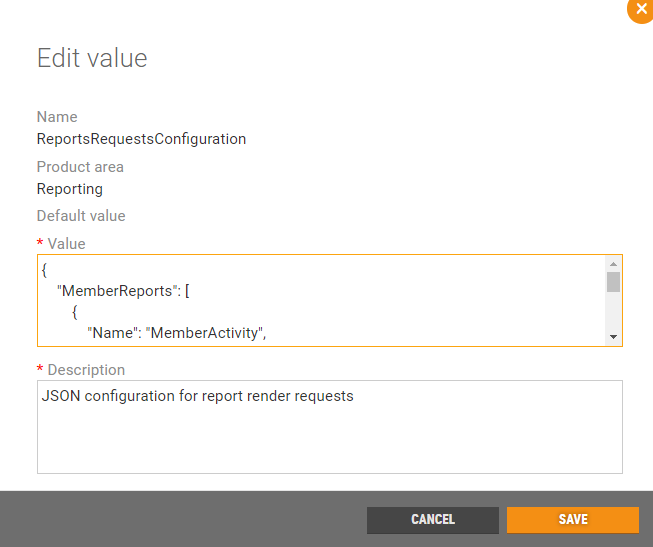
Editing system parameters is made more user friendly. When editing a system parameter the user clicks on the edit icon and a dialogue pops up, which makes it easier for the user to edit the value.
SMS Templates for Order Dispatch
(TFS: 163336, 165098, 165880)
In the user interface for Dispatch Rules a user can set up SMS messages through the dispatch order process in the "confirmation messages" tab. It is possible to customize messages by adding sms variables.The order messages are processed by the OrderMessageIntegration package (using service bus) and sent to customers in the following use cases:
Shipping confirmation - When the order is picked (but not split), meaning the whole order is shipped as one package, the customer will be receive this message as a confirmation that the package is on its way.

Split order message - When order is split and the items are dispatched in separate packages from e.g. Store A & B. The customer is notified via SMS that they should expect more than one package with different delivery dates.

Split order shipping confirmation - When Order is split and picked, this SMS will be sent to customer notifying them that package A or B is ready for shipment.

Pay & Collect - When the Pay & Collect order is ready to be collected at Store A.

The sms message templates are stored in new tables in the Retail database:
[Lindbak Retail].[CustomerOrder].[TextTemplateInDispatchRule]
[Lindbak Retail].[dbo].[TextTemplate]
Requirement: |
|---|
OrderMessageIntegration package: 1.1.1 |
Pay & Collect
(TFS: 176794, 176792, 176789, 177310)
A Pay & Collect order is a new type of delivery method made available in webshop. It allows customers to pay for items online and collect them in a given store. Pay & Collect orders can be made visible in the webshop through DispatchService. Once an order has been paid for, the order will be made available in InStore App under "order picking" when it is ready to be picked. (see release notes for InStore App regarding the picking process). The order can be found in the Chain Web menu "Package deliveries". The order may appear as more than one package in Chain Web, depending on whether or not the order was split. The user is then able to set the package as "delivered to customer", once it is picked up by the customer. By default, the orders which have status 'Delivered to Customer' are hidden - it is possible however to show it after removing filtering. A Pay & Collect order SMS is sent according to the SMS template configured in Dispatch Rules, after the order has been picked and it is ready to be collected in the store.
Pictures will be added in Confluence later*
Required configuration: |
|---|
Edit the JSON format for System parameter “CustomerOrderDeliveryMethod” with: { "Key": "PAC", "Text": "Pay&Collect", "Type": "Custom" } |
HUB Delivery
(TFS: 177088)
An option to add 'Preferred stores' is available in Dispatch rules in Chain Web. In this section, the user can add stores and postal number ranges. This functionality will dictate which stores are the preferred dispatch stores for the given postal numbers.
The functionality of the new feature is described as follows:
Postal codes are fetched from the postal codes register in Chain Web
Postal codes (available for given preferred store) are fetched for store country of preffered store
It is possible to use the same postal code ranges in several stores
It is possible to select range where start value is equal to end value
Validation has been implemented to avoid empty fields in range or situation when start value is higher than end value
Automatic cleanup of staging after 30 days
(TFS: 178999)
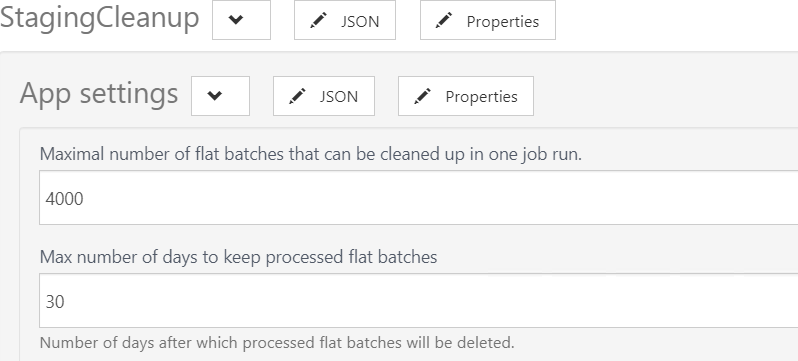
New app setting has been added to StagingCleanup job configuration 'Max. number of days to keep processed flat batches'. By default the value of this parameter is 30 days. StagingCleanup job is deleting all successfully processed batches older than number of days set in this parameter.
Improvements
Modules | Description |
|---|---|
Accounts Receivable | AddPaymentException during creating credit invoice (TFS: 177625) An AddPaymentException occured when receipts linked with the invoice had "CorrectedReceiptId" column filled with Id of the receipt, that had Amount >0. The problem was fixed and the AddPaymentException does not occur any longer and the invoice can be credited as normal. |
Customer | Customers created in Shop & Go (TFS: 171389) In some instances, when customers were created from Shop & Go or Webshop, the field "CustomerRemarks" contained angled brackets - which caused an issue with saving and editing the customer in Chain Web. This has been corrected and users can now save and edit these customers as normal. Credit limit not reduced from 9999999 (TFS; 175562) When the customers credit limit from POS is equal to 9999999, it will be changed to the value of the DefaultCustomerCreditLimit parameter in Chain Web. |
Customer order | Client side error when sending customer ordrer to credit (TFS: 171180) An irrelevant error message, that was displayed when sending customer orders to credit, has now been removed. Color Code in picking list (TFS: 178478) When an item contains ColorCode, ColorId and ColorName, the color will be displayed on the picking list. |
Invoices | More detailed error message (TFS: 169403) A detailed error message will be shown when trying to correct a receipt in invoice base that contains items from external providers (electronic items). Dependencies to another products: POS WCF 3.0.0.11701 or higher |
Order dispatch | Delivering freight item (TFS: 176697) If the last line in the picking order is removed or reassigned, the freight item is automatically reassigned to the other picking order. If that picking order has status delivered, the freight item is automatically set as delivered. If picking order has status 'New', the freight item is delivered with the dispatch order. |
Reports | Report for expiration date (TFS: 179775, 180091) In report for expiration date, the calculation of netcost is corrected (Report_0719). |
Stocktaking | Improved stocktaking jobs (TFS: 169511) The three jobs, StocktakingCommandsJob, CountListProcessorJob and CountingGroupProcessorJob are now reading events from a new table; Inventory.StocktakingJobsSchedule, and not from the service bus. The CompleteStocktakingCommand, CompleteCountingGroupCommand and ProcessCountListCommand events are now saved into this table. Events are not published to the StocktakingCommands service bus topic anymore. Each job runs every minute, reads all pending events of supported event type and then processes them:
Configuration:
Do not show count groups to users from other stores (TFS: 178479) A store users will only have access to the count groups assigned to the user’s store. HQ users will still have access to all count groups. Fixes of the filtering in the Count groups view (TFS: 178480) The filtering in the Count groups view returns the correct results when using the Inventory Date filter. Swedish characters in count groups (TFS: 178537) Swedish characters in count groups from third party are displayed correctly. Number of items in count group (TFS: 178763) Count groups imported from 3rd party will display the number of items in the count group. Improve error message for item sync (TFS: 178772) An error message regarding the item synchronization is improved, so that the item synchronization can be monitored more accurately. Exceptions will show the text "ItemSyncException". Removing count list from stocktaking (TFS: 179024) After removing a count list from a completed or active stocktaking, the user is redirected back to the count lists in the stocktaking. The count list can be removed from the stocktaking without opening it, by using the "more"-button (…). |