
Document status: RELEASED
Date:
Version Requirements for 2.9.220 is located on the menu to the left.
Highlights | |
|---|---|
Release version: 2.9.220  |
|
Update customer order and sale with new customer details
(TFS: 165498)
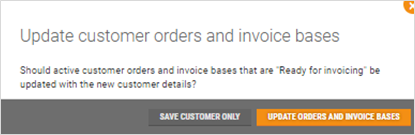
After editing customer details, such as name, address, email, phone number, company name or invoice fee, the user now gets the following pop-up window when saving changes (see picture).
If "Update orders and invoice bases" is selected:
Customer orders with status "Draft" and "Active" will be updated.
Sales in invoice base with status "Ready for invoicing" will be updated.
If "Save customer only" is selected:
Changes are only made to the customer and no changes are made to existing orders or sales.
Save EHF locally to file
(TFS: 165538)
It is possible to save the EHF invoice locally to a folder on the server, instead of onto an FTP Server (FTP server is the default selection). Saving the invoice locally can be selected on customer level by a user.

Service for cashier password change
(TFS:167665)
A new service has been created for allowing changing the cashier password in POS. Note that the new service can only be used to change the cashier password. The Chain Web user password is not affected. Have in mind, that Chain Web’s 'cashier login' and InStore App login uses the user password and after changing the cashier password via service, it will not be possible to login with new cashier credentials to InStore App and Chain Web.
Configuration: |
|---|
A new parameter is added to Backoffice system parameters: 'CashiersPinValidityTimeInMonths' that allows defining the validity of the cashier password. The link in the Web.config file for BackOffice should be updated: from: <add name="BackOffice.CashierService" uri="http://#BASESERVERNAME#/backoffice-service/UserManagement/v1/CashierService.svc" contract="BackOfficeIPingable"></add> to: <add name="BackOffice.CashierService" uri="http://chainwebappserver/LindbakRetail.Service.Host.IIS/UserManagement/v1/CashierService.svc" contract="BackOfficeIPingable"></add> |
See Release Documentation in POS for further description.
Improvements
Modules | Description |
|---|---|
Accounts Receivable | Sales from POSLogs that failed towards Chain Web (TFS: 171100) Credit sales from POSLogs that had been put on hold, failed towards Chain Web, so the credit sales were not found in Chain Web. This is corrected, and all the sales is handled so that they appear in Chain Web. |
Customer | Add customer number validation (TFS: 170224) All redundant characters will be cut from the linked association number, only digits will stay. This means it will not be possible to have customer numbers with special characters included in the number. In result, the proper customer number will be linked to the member. Customer validation (TFS: 168200) Changed the validation of customer fields between Chain Web and Chain to reduce the amount of error messages created when exporting customers to Chain. This means customers will not be exported to Chain if required customer information is missing upon export. The following new rules have been implemented:
|
Customer groups | Clicking “back” in browser should not trigger “unsaved changes” pop-up (TFS: 171266) After clicking 'back' in the browser, when opening and not changing anything in 'Customer Group', the 'Unsaved Changes' pop-up does not appear if no changes are made. Pop-up does appear if discount is added, and without finishing the step, the back-button is clicked. |
Customer order | Wrong summation in Customer order (TFS: 170485) If new items were added to a finished Customer order that was previously paid in POS, and then sent to credit, the previously paid amount was subtracted from the sale total. This is corrected. Wrong amount in some customer orders (TFS: 171985) Customer orders that were paid in POS did not get the correct total amount in the customer order, if more items were added to the order in Chain Web. This is now corrected. |
Discount | New type of discount (TFS: 169553) A new type of discount is added: Brand discount. This can be added in the customer view, or in customer group. |
Dispatch orders | Moving freight to new picking store (TFS: 170112) Previously, freight was not moved when:
Freight item is now moved to the same store as the last item when it was reassigned. |
General | Show error message for amount or quantity above limit (TFS: 167672) New error message is created for when amount is higher than amount defined in parameter “TransactionTypeLimits”. The error will be shown in credit sale/customer order/InStore App, when the user changes amount or quantity. The following messages will be shown:
Resuming on hold receipts (TFS: 171144) Corrected that a new receipt is started correctly after choosing not to resume an existing on hold receipt. |
Home page | Sales data on Home page (TFS: 170171) The logic for getting last year’s sales data is corrected. Now, all days use correct dates to compare against. |
Invoice export | Change “Fakturaeksport” to “Eksport av fakturajournal» (TFS: 170789) «Fakturaeksport» has been changed on “Eksport av fakturajournal”, to better describe the functionality. |
Project | Missing translation for Invoice statuses in Project > Sale (TFS: 149432) In Project > Sales tab, the Invoice statuses were missing translation in Norwegian. This is corrected. |
Reason Codes | Localizations of reason codes (TFS: 171267) All the 'Reason Codes' in Chain Web have correct localizations in english. Some of their names have been changed and gotten new Norwegian translations. For example:
|
Reports | Department sales (TFS: 170670) Description: In report for department sales it is now possible to select "All" weekdays. This is to make it easier when running report for multiple days. Changed report : 0505_DepartmentSales Top sales per item - performance improvement (TFS: 171476) Description: In report for top sales we have refactored queries to improve overall performance in the report. Changed report: 0715_TopSalesPerItemWithCompareDate |
Stocktaking | New parameter to hide step about deactivating items (TFS: 169980) The step regarding deactivation of items, when finishing stocktaking, can now be hidden. Required configuration: New configuration parameter was added: ShowDeactivateItemsStepInCompleteStocktakingWizard ShowItemsNotCountedStepInCompleteStocktakingWizard must be set to "False". “Items with error” does not show the items (TFS: 170140) When clicking on "Items with errors" link, the items were only displayed in the popup the first time the link was clicked. This is corrected and the items will always be displayed. Unable to delete item (related to TandemEan) from count list (TFS: 168287) The problem with irremovable items has been fixed. After revalidation, deleted items will not be added to the count list again. Description in Deviation tab (TFS: 169379) When viewing within 'Stocktaking' a description which informs about Items displayed in 'Deviation Table' has been placed above 'Deviation Table'. Now the user is informed which Items are returned in the 'Deviation Table'. Columns removed from stocktaking (TFS: 169382) In stocktaking, of the type “Items not counted since”, the columns “Count group name” and “Count group completed” are removed, and tab Count list is hidden. |