Connected Detectify
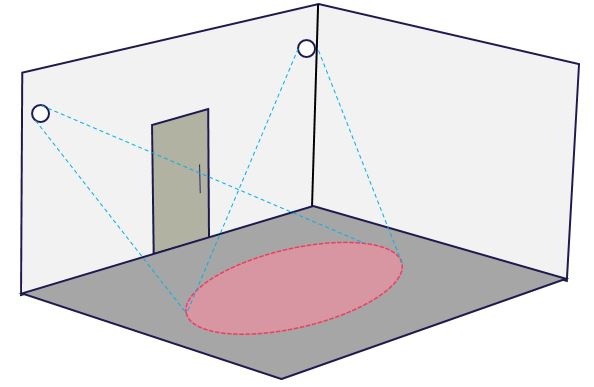
Connected Detectify is a motion detector for indoor purposes, based on a passive infrared technology sensor with a detection area up to 5 meters.
There are two versions available:
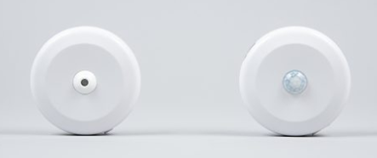
a narrow 30 degree measuring beam for workstations
a wider one with a measuring beam over 90 degrees for rooms.
Sensor logic
The device sends 'occupied message' immediately when movement is detected.
When the device does not detect movement anymore, the sensor will begin an inactivity detection period. This detection period can be configured. The shortest period is 5 minutes.
The device sends ‘unoccupied message’ after the inactivity detection period is finished and if the sensor has not detected movement within the inactivity detection period.
Recommended inactivity detection period for different types of spaces:
Workstation - 15 minutes
Meeting room - 10 minutes
Phone booth - 5 minutes
Sigfox Network
The devices use Sigfox 0g network, read more about it here.
Check the connectivity of Sigfox network in your location from these websites:
- Globally: https://www.sigfox.com/en/coverage
- In Finland: https://coverage.iniot.fi/
Installation Guide: Connected Detectify
For the installation you need:
The EG Inventory app in your mobile phone
User rights and Space management role in EG Optimaze
Sensor devices
Tools for the installation e.g. ladder, drill, screws/double-sided tape
Installation for workstations
Please refer to the latest installation instruction from the device manufacturer’s website.
Use a narrow version for workstations
- Turn the power switch on by using a paperclip or a small screwdriver to slide the switch to I position
Note that the switch should slide relatively effortlessly. Do not use excess force to slide the switch!
Connected Detectify R5 and newer models have also a Sigfox-LoraWan switch. It is preset to Sigfox (SG), do not switch it to LoraWan (LR) if you do not plan to use LoraWan IoT Network.
Scan the QR code or enter the sensor ID manually with EG Inventory app
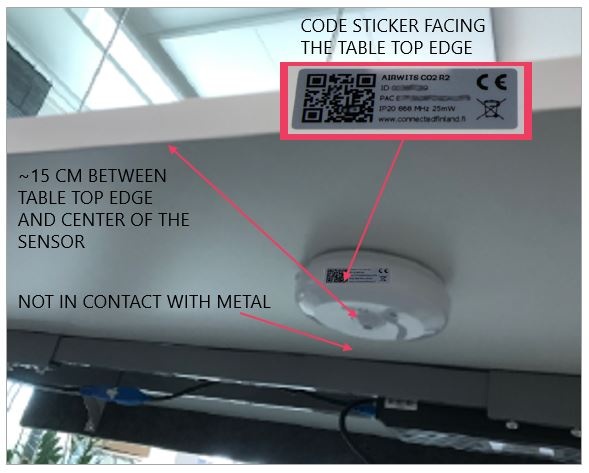
Attach a screw plate underneath the table top in the middle approx. 15 cm from the table top front. Use screws or double-sided tape for the attachment.
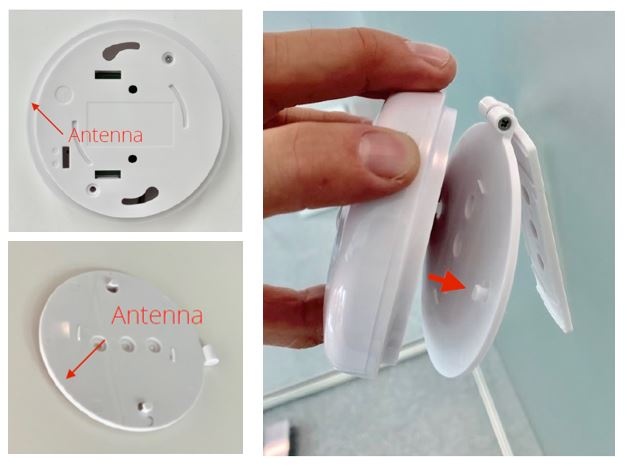
Attach the sensor to the screw plate. The sensor’s antenna is located below the QR code sticker. Always place the sensor so that the antenna is not directly facing metal.
Installation for meeting rooms
- Use a wide version for meeting rooms
- Turn the power switch on by using a paperclip or a small screwdriver to slide the switch to I position
Note that the switch should slide relatively effortlessly. Do not use excess force to slide the switch!
Connected Detectify R5 and newer models have also a Sigfox-LoraWan switch. It is preset to Sigfox (SG), do not switch it to LoraWan (LR) if you do not plan to use LoraWan IoT Network.
- Scan the QR code or enter the sensor ID manually with EG Inventory app
- Place the sensor to face towards the area, where the people will most likely be
Attach the hinge to the wall and make sure the hinge is pointing to metal support structure (if any)
Attach the sensor device to screw plate pins so that the antenna is pointing away from metal and twist gently clockwise until device locks in place
You can adjust the angle of the sensor with the hinge
Finally tighten the hinge screw