I hyresadministrationen redigeras faktureringsuppgifterna för en befintlig hyresgäst i hyresgästens uppgifter. Välj i huvudmenyn antingen ut- eller inhyrning och sedan administration av avtal.

Välj i hyresgästträdet den hyresgäst vars uppgifter du vill redigera.
När du vill redigera kundens faktureringsuppgifter, ska du först välja hyresgästen flik Faktureringsuppgifter och sedan välja Redigera hyresgästens standardfaktureringsuppgifter...

Redigera eller lägg till önskade uppgifter och välj Spara.
Redigera avtalets faktureringsuppgifter
Ibland kan det uppstå behov av att redigera faktureringsuppgifterna för ett specifikt avtal. Faktureringsuppgifterna kan redigeras avtalsspecifikt i hyresgästens uppgifter.
Gå till fliken Faktureringsuppgifter på hyresgästens samlingssida.
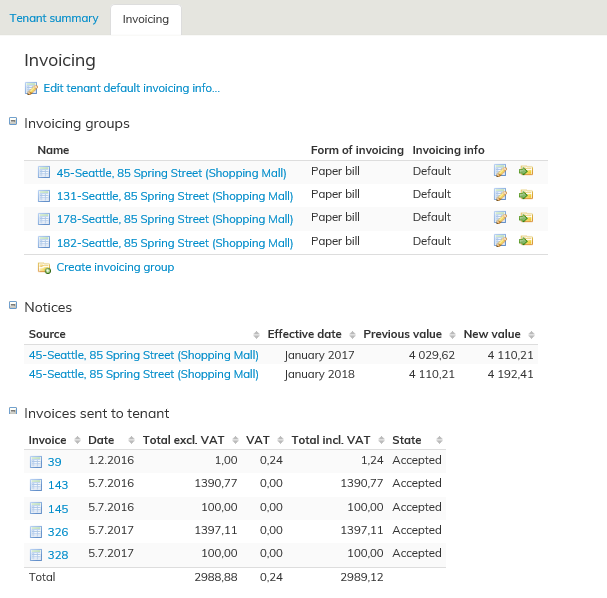
I fönstret som öppnas ser du en lista över hyresgästens avtal.
I tabellen kan du vid det önskade avtalet välja pennsymbolen, varvid du får åtkomst till att lägga till/redigera faktureringsuppgifterna för det ifrågavarande avtalet.
I listan över avtal visas även en uppgift om huruvida avtalets faktureringsuppgifter är standard- eller redigerade uppgifter.
Du kan även gruppera fakturor med pilknappen Flytta till fakturagrupp, vilket underlättar administrationen av faktureringsuppgifter.
You can edit the invoicing information of an existing tenant on the tenant information page under lease management.
Select first Outrent or Inrent from the main menu and then click Agreement management.
From the tree structure, select the tenant whose information you want to edit.
If you want to edit the invoicing information of a customer, select first the tenant’s
Invoicing tab and then Modify tenant’s default invoicing info...
Edit of add the desired information and select Save.
Editing invoicing information on an agreement
Sometimes you might have to edit the invoicing information in a certain agreement. You can edit the invoicing information in an agreement from the tenant information page.
From the tenant summary page, go to the Invoicing tab.
The agreements of the tenant are listed in the window that opens.
You can click on the pen icon next to one of the agreements listed to add/edit the invoicing information in the selected agreement. In the agreement listing, you can see whether the agreement has default or edited invoicing information.
You can also group the invoices with the button Move to invoice group , which makes the invoicing information easier to manage.