...
Inmatning av IFRS
...
IFRS data can be managed in accepted inrent agreements. The data is shown in the agreement summary page on a separate tab.
The data can be entered only by companies that are using IFRS calculation.
By default, an accepted agreement is taken into account in reporting, but it can also be disregarded by unticking the ‘Use in IFRS reporting’ check box on the top of the view.
The selection determines whether the agreement is included in the balance sheet or not. With the selection, you can filter those agreements that are either included or not included in the balance sheet. You can still enter information for all agreements, and the rents specified in them will be calculated in the data storage.
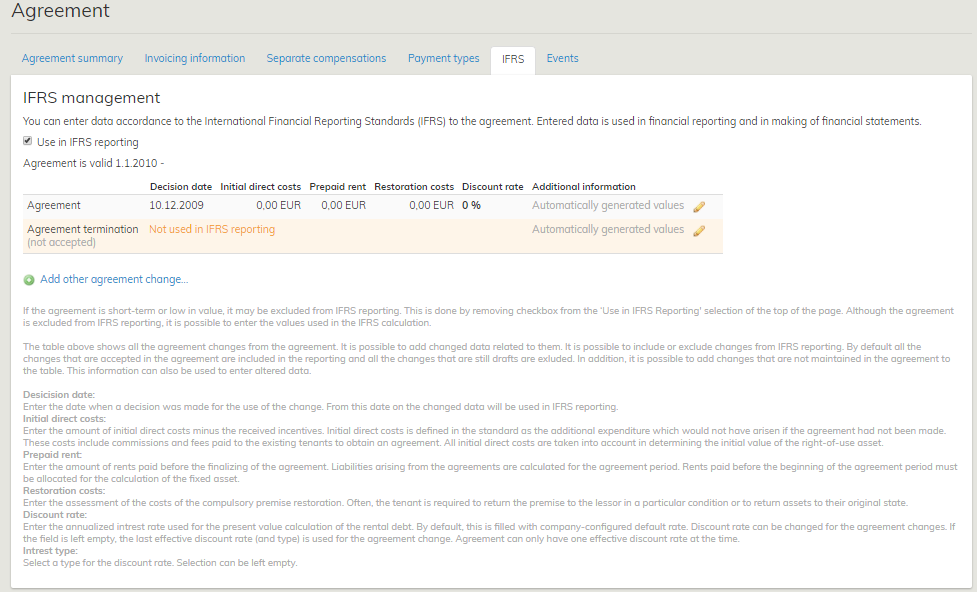
The IFRS tab displays the agreement term, as well as a table in which each agreement and the changes made in them are shown in separate rows. Here, the changes to the agreement are
1. Change document
2. Rent correction document
3. Renewal option
4. Automatic renewal option
5. Terminating the agreement
In addition to these changes, you can enter another related change to the agreement. This option can be used, for example, when the discount rate used in the agreement changes but the agreement itself does not.
You can enter information on each row in the table:
Decision date
- The date on which the decision about using the change in question was made, i.e. from which date onward the change should be considered in IFRS reporting.
2. Initial direct costs
- In the standard, initial direct costs are specified as additional costs that would not have been incurred, if the lease agreement had not been made. These costs include provisions, as well as any payments made to current tenants, in order to reach the lease agreement. All of the initial direct costs will be taken into account when determining the original value of the right-of-use asset. Enter the initial direct costs less any incentives received.
3. Prepaid rent
- Any liabilities related to lease agreements are calculated from the agreement period. The rents paid prior to the agreement period should be detailed for the calculation of the right-of-use asset.
4. Restoration costs
- An estimate of necessary reinstatement costs for the premises. Often, the tenant is obligated to return the premises to the lessor in a certain state, or to reinstate the property item location specified as the object of lease.
5. Discount rate
- The annual interest rate used for calculating the current value of the rent arrear. By default, a company-specific default interest rate is used in the agreement.
6. Interest type
- The type of the discount rate. The type will not affect calculations, but it is used in reporting.
7. Additional information
- In this field, you can type additional information regarding the row.
When the agreement is terminated, it is possible to set a new end date for the agreement. You need to determine a name for the Other option.
The information is entered in currency selected for the agreement.
Initial direct costs, Prepaid rent and Restoration costs are treated as non-recurring in the calculations, and they are considered only for the month for which their decision date is set. The discount rate, on the other hand, is considered each month for the entire agreement period. An agreement can have only one valid interest rate at a time. The interest rate that is valid is determined according to the last row taken into account (as per the decision date).
Agreement
The agreement row is created automatically when finalizing the agreement. The decision date for the agreement row is set by default according to the signature date entered for the agreement. However, if the entered signature date comes after the agreement begins, the begin date of the agreement is used as the decision date. Initial direct costs, Prepaid rent and Restoration costs are set by default to EUR 0.00, and the default discount rate entered for the company is set as the discount rate. In addition, the field Interest type is empty.
You can edit the information by clicking the pen icon on the right side of each row. Editing information takes place in modal.[EN1] If someone saves information, the details are recorded in the system log (who, what, when).
Changes to the agreement
For the IFRS, any changes to the agreement are treated so that they become effective from the date on which the implementation of the change is deemed probable (the decision date of the change). The decision date of the change is different than the date when the change actually becomes effective. A date on which a decision to continue the agreement (option) is made, for example, differs from the date when the option is actually exercised. When changes are made to an agreement, the parameters used in IFRS calculation might change.
In addition to the entire agreement, you can select single rows of agreement changes to be included in the reporting. By default, the rows of agreement changes are set in the ‘Not included’ state. If the agreement change is accepted in the agreement, the information on the row in question will change automatically to Included also in the IFRS tab. The user can manually change the status of a row, e.g. if it is to be supposed that the renewal option is used, even though it has not been exercised on the agreement yet.
If a row is marked as Included, you can enter IFRS data relating to it. By clicking the pen icon, a modal appears. Here, you can enter changed values. Those fields that are unaffected by the changes made to the agreement should be left blank.
For accepted change documents and options, the date of their acceptance is automatically used as their decision date. If the date of the acceptance comes after the begin date of the agreement change, the begin date of the change document / option is used as the decision date. If the user changes the status of a row manually to Included, the decision date is set by default to the current date. The decision date is mandatory.
The discount rate and interest type are generated to the row of the agreement change from the previous row (as per the decision date).
The interest rate that is valid is highlighted in the table. An agreement can have only one valid interest rate at a time.
IFRS calculation
The rents for the agreements, as well as the IFRS data entered, are calculated in the data storage. Both the data obtained directly from the agreement (e.g. rent) and the values entered in IFRS tab (e.g. discount rate) are used in calculation. The data is stored automatically to the data storage, whenever changes to the agreements are made.
In IFRS calculation, the rents excluding the tax are used (VAT 0).
The data is organized by the month in the data storage. When searching, you need to determine the reporting month according to which the data is shown.
-uppgifter
IFRS-uppgifter kan administreras i godkända inhyrningsavtal. Uppgifterna visas på en egen flik på avtalets samlingssida.
Uppgifter kan matas in endast av företag som använder IFRS-redovisning.
Ett godkänt avtal beaktas som standard i rapporteringen men man kan också låta bli att beakta avtalet genom att ta bort valet ”Beakta i IFRS-rapportering” uppe i fönstret.
Valet avgör om avtalet hör till balansräkningen eller inte. Med hjälp av detta val kan du i rapporteringen filtrera de avtal som hör/inte hör till balansräkningen. Du kan dock mata in uppgifter i alla avtal och deras hyror beräknas i databasen.
IFRS-fliken visar avtalets giltighet och en tabell, där avtalet samt alla avtalsändringar visas som rader. Avtalsändringar i detta sammanhang är
1. Ändringsdokument
2. Hyresändringsdokument
3. Förnyelseoption
4. Automatisk förnyelseoption
5. Uppsägning av avtal
Vid sidan av dessa ändringar kan du också mata in andra ändringar i avtalet under ’Annan’. Detta alternativ kan användas t.ex. när diskonteringsräntan som används i avtalet ändras, men själva avtalet förblir detsamma.
Du kan ange uppgifter på varje rad i tabellen:
1. SlutdatumDatum då beslut fattades om att tillämpa den aktuella ändringen. Dvs. från och med när denna ändring ska beaktas i IFRS-rapporteringen.
2. Direkta utgifter i inledningsskedet
Direkta utgifter i inledningsskedet definieras i standarden som tilläggsutgifter, som inte skulle ha uppstått om inget hyresavtal hade uppgjorts. Dessa utgifter är till exempel provisioner samt betalningar som gjorts till de nuvarande hyresgästerna för att ingå hyresavtalet. Alla direkta utgifter i inledningsskedet beaktas vid fastställandet av det ursprungliga värdet på
nyttjanderätten. Direkta utgifter i inledningsskedet med avdrag för erhållna incitament anges här.
3. Hyror som betalts före avtalets starttidpunkt
Ansvar till följd av hyresavtal beräknas för avtalsperioderna. Hyror som betalts före avtalsperiodens början ska dock specificeras för beräkningen av anläggningstillgång.
4. Restaureringskostnader
En uppskattning av det penningbelopp som behövs för ett obligatoriskt återställande av hyresobjektet i ursprungsskick. Ofta är hyrestagaren skyldig att återbörda objektet till hyresgivaren i en viss kondition eller att återställa tillgången/lokalen som är föremål för avtalet i ursprungligt skick.
5. Diskonteringsränta
Årsränteprocent som används för beräkning av hyresskuldens nuvärde. Som standard för avtalet används en företagsspecifikt fastslagen standardränteprocent.
6. Räntetyp
Diskonteringsräntans typ. Typen påverkar inte redovisningen men den används i rapporteringen.
7. Mer information
Öppet textfält för information om aktuella rad.
I samband med avtalets uppsägning kan man också fastställa avtalets nya slutdatum. Ange också ett namn för alternativet ’Annan’.
Använd den valuta som valts för avtalet vid inmatning av uppgifter.
’Direkta utgifter i inledningsskedet’, ’Hyror som betalts före avtalets starttidpunkt’ samt
’Restaureringskostnader’ är av engångsnatur med tanke på redovisningen och beaktas endast för den månad då de avslutas. Diskonteringsräntan däremot beaktas varje månad under hela avtalets giltighet. Avtalet kan ha endast en giltig ränteprocent. Den gällande procenten fastställs enligt den senast beaktade raden (enligt slutdatum).
For agreements valid until further notice, an imputed end date is calculated: first possible term of notice + term of notice.