...
Commuting data is collected through a web-based survey. Rapal EG Finland Oy manages the survey and the import of commuting data to Optimaze. For this reason, these functions are not dealt with in this user guide.
...
Completed calculations need to be locked under Locking. Only after the calculations have been locked, the results can be reported in Channel.
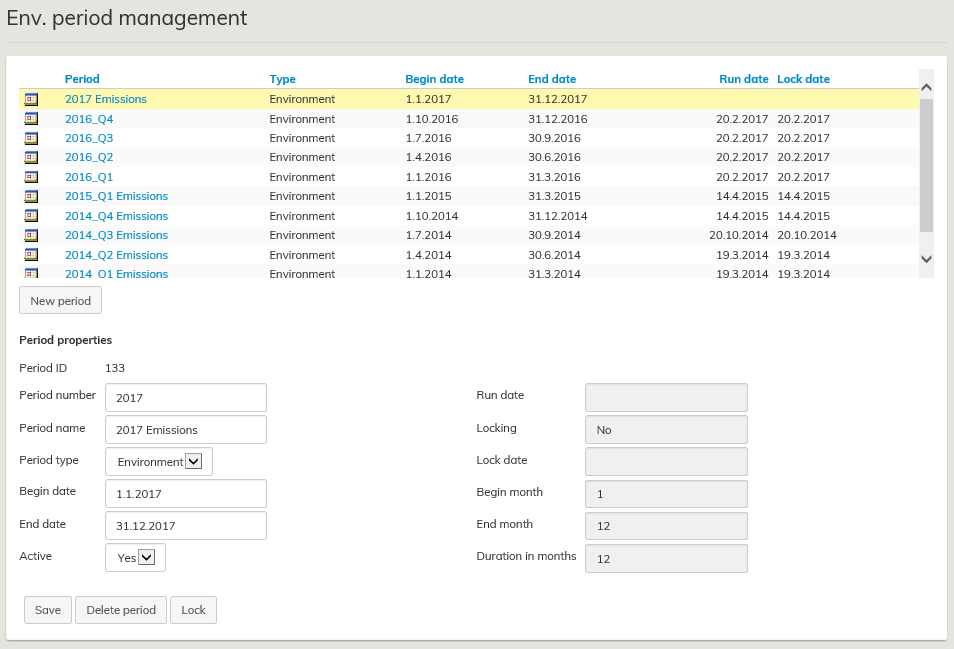
New calculation is started by creating and saving a time period for the calculation.
...
Actual consumption and traveling data is imported to Optimaze with an Excel transfer file using a custom formatted template at Import calculation data. Information on energy and water consumption is transferred with site-specific transfer files, and information on business travel and paper consumption is imported with organization-specific files.
Site-specific data
Site-specific data includes:
...
The summary of all calculated and imported data shows up-to-date information on actual consumption and emissions based on imported files and calculations. Where actual data or expanded data based on actual data is not available, it is replaced with an estimation based on an average consumption and emission figures. If there is no actual consumption data imported to the system, the consumption and emission data shown in the summary is all based on automatically generated values. The quality number on the right indicates the type of data, 4 being actual data and 0 being estimated data.

When importing site-specific data, there are two possible situations where the import is interrupted: Error  and Warning
  .
.
...