A budget template is a budgeting tool in Optimaze, and it is where the actual budgeting takes place. Rapal’s EG Finland’s financial support creates the budget template based on the information the customer wishes to use.
...
When you have decided which information is used as a basis for the budget, Rapal’s EG Finland’s financial support can be requested to create the budget based on the desired information. Send notification to Rapal’s EG Finland’s financial support at: tuki@optimaze.net.
Budgeting with the budgeting tool
Rapal’s EG Finland’s financial support creates a budget template based on desired information. The budget itself is then edited in the template.
...
If you wish to budget for account titles that are not found from the account map in Optimaze Moment, you need to notify Rapal EG Finland's support about them. They then add the missing account titles in the account hierarchy.
...
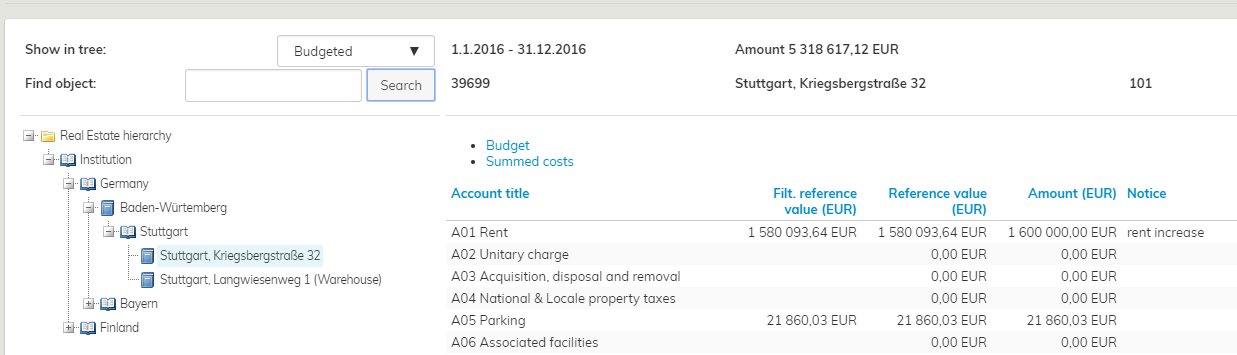
3. From the real estate hierarchy, choose the site whose costs you wish to edit.
| Tip |
|---|
You can use filtering with budgeting too. If the filtering option is used, the tree-like list shows only those sites selected for the filtering. |
...
If the costs of a certain site are unclear and you need to get back to the budgeted costs later, you can mark the site as unclear by clicking on the icon. Once the budgeting is done, you can check the items marked with these symbols and verify that the costs for each budgetable site have been processed. By using these icons, you can go through the budget in several occasions and still be able to check straight away, how well the budget is coming together.
| Tip |
|---|
You can search for sites based on the icons described above by using the Show in tree pull-down menu on the upper part in the budget template.
You can select budgeted or non-budgeted sites, unclear sites or all sites. Now, the tree-like list shows only the filtered sites. |
...