Creating an offer using the Agreement management
From the main menu, select Outrent and then Agreement management
Tarjouksen tekeminen sopimusten hallinnan kautta
...
.
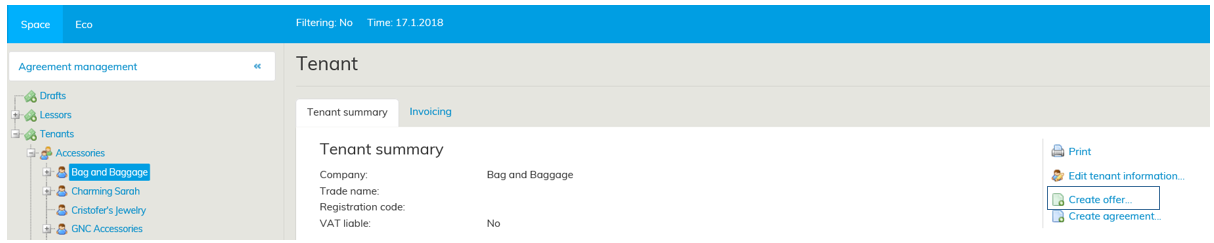
Sen jälkeen valitse puusta asiakas, jolle haluat tarjouksen tehdä ja lopuksi työikkunan oikeasta reunasta Luo tarjous -linkistä
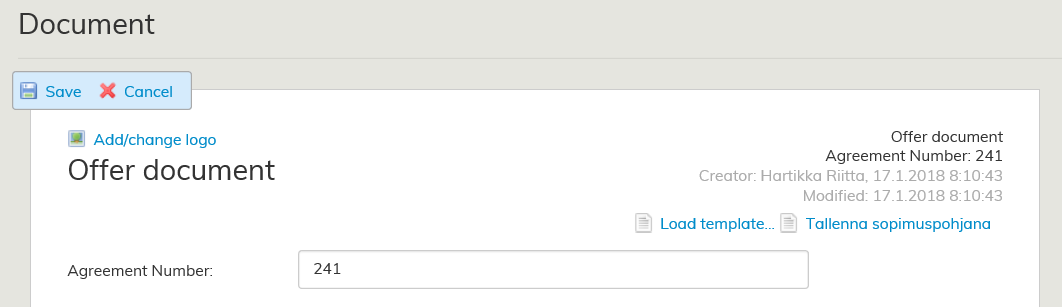
Työikkunaan avautuu tarjouslomake, johon tarjoukseen liitettävät tiedot täytetään. Tarkempi ohje lomakkeen täyttämisestä löytyy kohdasta Tarjouslomakkeen täyttäminen.
Monet tiedoista täyttyvät automaattisesti tehtyjen valintojen perusteella esimerkiksi vuokranantajan tai vuokralaisen yhteystiedot.
Tarjouksen tekeminen vuokra-alueiden hallinnan kautta
Valitse päävalikosta Ulosvuokraus ja Vuokra-alueiden hallinta. Valitse puusta vuokra-alue, josta haluat tehdä tarjouksen ja sen jälkeen työikkunan oikeasta reunasta Luo tarjous.
Valinta voidaan tehdä normaalin vuokra-alueen, pysäköintialueen tai maa-alueen koontilomakkeen sivulta.

Työikkunaan avautuu tarjouslomake, johon tarjoukseen liitettävät tiedot täytetään. Valitun vuokra-alueen tiedot päivittyvät lomakkeelle automaattisesti siihen liitettyjen tietojen osalta.
Then, from the tree-like list of customers, select the customer for whom you wish to create the offer.
Click Create offer on the right of the workspace.
An offer form appears on the workspace for filling out the information used for the offer. For detailed instructions on how to fill out the form, see section Filling out the offer form.
Most of the data is filled out automatically based on previously entered information (e.g. contact information for the lessor and tenant).
Creating an offer using the Rental area management
From the main menu, select Outrent and then Rental area management. From the tree-like list, select the rental area, for which you wish to create an offer. Then, click Create offer on the right of the workspace.
The selection can be made on the summary page of normal rental area, car park or land area.
An offer form appears on the workspace for filling out the information used for the offer.
The information on the selected rental area is filled out automatically, based on previously entered information.
If you want to create an offer for more than one space, you can add rental areas in the offer form or create the offer using the building summary page
...
.