I punkten Hyresjustering kan du välja olika justeringsvillkor för avtalet.
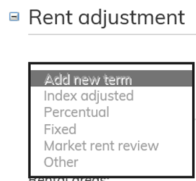
I punkten Hyresjustering väljer du hyresjusteringssätt för det valda villkoret. I rullgardinsmenyn Lägg till ny hyresjustering kan du välja Hyresjusteringsvillkor. Villkoret kan vara Indexbunden, Procentuell, Fast hyresjustering eller Justering av marknadshyra eller Annan.
För alla justeringsmetoder kan man välja antingen första möjliga justering eller justering vid dokumentets startdatum. OBS! När detta väljs, görs hyresjusteringen på startdagen och dessutom i enlighet med hyresjusteringsmånaderna.
Om hyresjusteringsgrunden är en fast procentsats, välj justeringsintervall, justeringsmånader och lägg till höjningsprocent. Närmare instruktioner finns i bruksanvisningens punkt Fast hyresjustering.
Om hyresjusteringsgrunden är ett fast belopp, välj justeringsintervall, justeringsmånader och lägg till totalt höjningbelopp. Närmare instruktioner finns i bruksanvisningens punkt Fast hyresjustering.
Om du väljer Indexbunden som justeringsgrund, välj justeringsintervall och de övriga uppgifterna enligt instruktionerna i punkten Indexbunden hyresjustering .
Om hyresjusteringsgrunden är Justering av marknadshyra, justeras hyran enligt marknadspriset. Ange justeringsintervall, hyresjusteringsmånad, första justeringstidpunkten samt tidpunkt för när meddelande skickas till kunden. Närmare instruktioner finns i punkterna Justering av marknadshyra och Uppdatering av marknadshyra.
Du kan också välja att inte skicka något meddelande till kunden före hyresjusteringen. Detta gör du genom att ta bort valet i punkten ’Meddelande bör skickas till hyresgästen’.
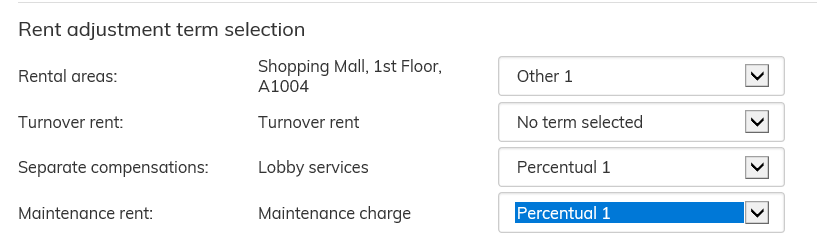
När hyresjusteringsvillkoren har skapats, finns de under punkten Allokering av hyresjustering. Man kan välja olika justeringsvillkor för hyresraderna. Undantaget är Fast justering som inte
allokeras
Under Rent adjustment, you can select various adjustment options for the agreement.
Once rent adjustment terms have been entered, you can choose a suitable rent adjustment type under Rent adjustment. You can select a new rent adjustment term from the Add new term pull-down menu. The options are Index adjusted, Percentual, Fixed, Market rent review, or Other.
For every rent adjustment type, it is possible to select either first possible adjustment date, or then adjust rent on the beginning date of the document. NOTE! When this is selected, the rent adjustment is carried out on the beginning date, as well as according to the rent adjustment months.
If the rent adjustment type is a fixed percentage, select the adjustment frequency, adjustment months, and rent increase percentage. For more detailed instructions, see the section Fixed rent adjustment in the user guide.
If the rent adjustment type is a fixed sum, select the adjustment frequency, adjustment months, and total increase amount. For more detailed instructions, see the section Fixed rent adjustment in the user guide.
If you select the rent adjustment type to be Index adjusted, you must first select the adjustment frequency and other information as described under Index adjusted rent adjustment in the user guide.
If the rent adjustment type is Market rent review, the rent is adjusted according to the market rent. Define the rent adjustment frequency, rent adjustment month(s), the date of the first adjustment, as well as the date when a notification about the rent adjustment must be sent to the customer. For more detailed instructions, see sections Market rent review and Market rent update.
You can also choose not to send a notification about the rent adjustment to the customer before the rent adjustment takes place. This is done by unticking the ‘Notification of change must be’ check box.
Once the rent adjustment terms have been entered, they are found under Rent adjustment term selection. It is possible to select different adjustment terms for each of the agreement rows. This does not apply for Fixed adjustment, as it does not have an allocation.