Creating a new tenant
You can create a new tenant in the tenant register through Agreement management.
Select first Outrent or Inrent from the main menu and then click Agreement management.
A tree-like list of tenants will open up in the workspace.
...
If a representative, for example, is handling the tenant’s affairs and the notification should be sent to that representative, you can choose the option Send the rent review notification to the invoicing address.
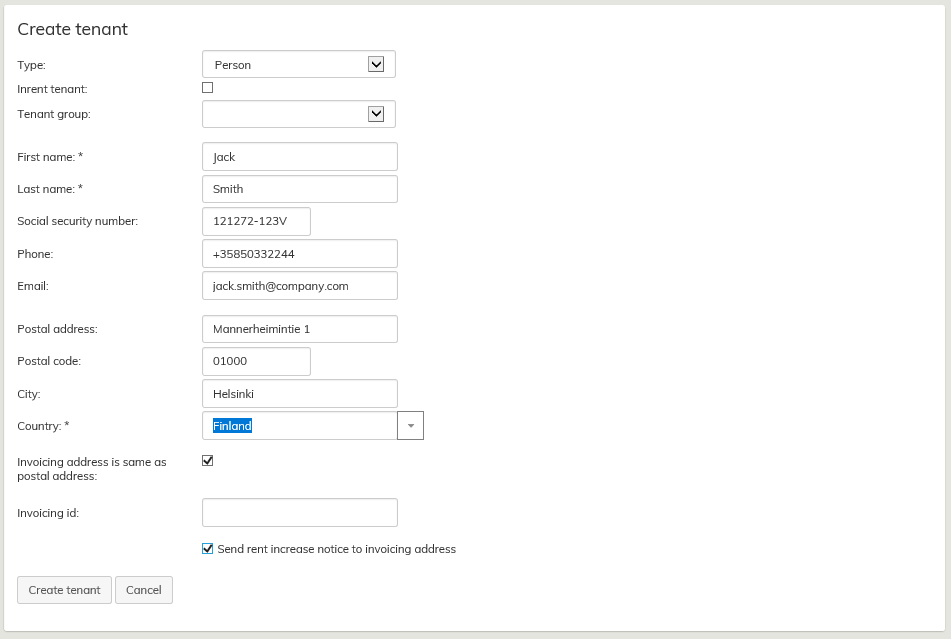
Information on the tenant can include a default invoicing address that differs from the postal address, such as when the tenant does not personally pay the rent.
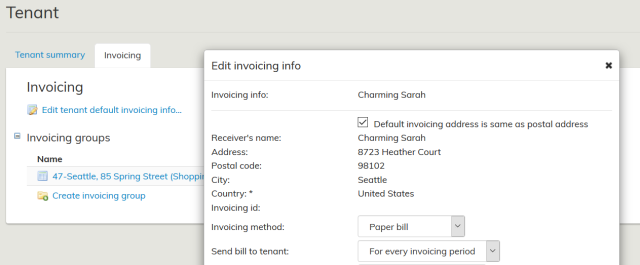
In Invoicing, select whether the default invoicing address is the same as the postal address entered in the tenant summary. The default is the same as the postal address, by default.
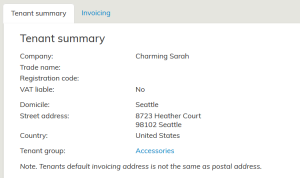
If the user deletes the default selection and specifies a default invoicing address for the tenant that differs from the postal address, the tenant summary displays a comment on the matter.
When you have filled in the necessary fields, select Create tenant.
Tenants can be grouped by a tenant group. You can create a new tenant group as described under Creating a new tenant group.
Editing tenant information
When you want to edit information for an existing tenant, select Outrent or Inrent from the main menu and click Agreement management. From the tree-like list of tenants, select the tenant whose information you want to edit. The basic information on the tenant, as well as the tenant’s invoicing information, will open up in a separate tab on the workspace.
...
While creating the agreement, you can select a contact person for each agreement.
Removing tenant information
You can only remove those customers from the agreement party register, for whom no agreements, offers or other documents are created.
...