Purpose
Here you will find the instructions on what CuHa should do when a salon wants to leave / terminate their contract with Timma.
Scope
If the salon wants to stop using Timma. For individual Users ending their contract see this article (Needs to be written)
Definitions/Acronyms
- Main user: Person with contract and admin rights in Salon.
- Support: Person handling the case at Timma.
Step-by-step guide
Salon contacts Timma via Phone (N.B. Termination of contracts are never accepted on the phone, to prevent mistakes / misunderstandings)
- Step 1: Communication
- Step 1.1: Ask the main user to send an email regarding the termination of contract with the following information:
- Business ID
- Name of company (salon)
- End date
- Step 1.2: Ask the reason for termination of contract. e.g. “If you want to tell us why you are leaving, that would help us make our system better.”
- Step 1.3: Based on your country’s win back policy see section X for follow up steps.
- Step 1.4: If clear case that they cannot be won back proceed to Step 2.
- Step 1.1: Ask the main user to send an email regarding the termination of contract with the following information:
Salon contacts Timma via email
Step 2: Termination of contract
- Step 2.1.1: Based on the message choose which macro you will send them. e.g. If they send over messenger “I want to stop using Timma” and nothing else, with no clues as to who they are. Send Churn: automatic answer
If they are switching to another system send Churn: Switching to another system, and start the win-back process.
- Step 2.1.1: Send a response confirming that we have received the termination request. (FI: Use Macro “Churn: automatic answer” or “Churn: Switching to another system)
- Step 2.2: Add the tag churn in intercom to the email! (e.g. Churn: FI, Churn: NO)
- Step 2.3: Win back attempt, if relevant.
Option 1: Winback successful
- **👍 No need for further actions
Option 2: Termination proceeds**
Step 2.4: Check what additional products the salon is using in Hallinta.
Cashier
Timma Pay
Nets
Website
- SMS
Check the One-off SMS cost and return shipping cost of Timma Pay, and notify the salon about them. Create a bill in Hallinta for them.
Step 3: No additional products
Step 3.1: If the salon just uses the calendar ( not the cashier) you can send them our help article for “Offboarding calendar” and confirm their termination of Timma.
- Step 3.2: If the salon uses the cashier inform them that they need to download all of their sales reports, product reports etc. If possible send our help article to the main user when the salon wants to quit Timma and uses our cashier. (NOTE, No such article at the moment as of June 2024)
- Step 3.3: If the salon uses Timma website follow the steps from step 5.
- Step 3.4: Check that all of their latest invoices have been paid. If not, ask the main user to pay them before we approve the termination. Also send the unpaid invoice/invoices to the main user.
- Step 3.5: If the salon has paid all of their latest invoices - correct the billing with the asked end date or end date from the latest invoice. If the salon uses a payment terminal from Nets follow steps from step 4 below. For Timma Pay see separate article.
- Step 3.6: When the termination has been confirmed, set a date for account deletion in Hallinta. For more on that see Step 6.
Step 4: If salon uses Nets payment terminal
Step 4.1: If we do not invoice the salon for the terminal, and they want to terminate their contract ask them to contact Nets directly. If we invoice the salon follow step 4.2.
Step 4.2: If we invoice the salon for the payment terminal, look up if there is any remaining time on the contract. If there is any remaining time → Invoice the salon for the remaining period.
Step 4.3: If there is not any remaining time on the contract contact nets via email with following information: TermID, company name, business ID and end date for the termination of the contract.
Step 4.4: After sending the email to Nets - inform the main user that we are waiting for the approval of the termination.
Step 4.5: When you have received the confirmation from Nets - then can you add the end date to all the billings and inform the main user about the termination for both Timma and Nets. For specific details for Timma see steps from step 1.
Step 5: If salon uses Timma website
Step 5.1: If salon want to keep their domain proceed to step 5.2 If not go to step 5.3 (Domain is always paid for a year and no returns given on that)
Step 5.2: If they want to keep the domain we give them domain transfer key so that they can keep it for the future. For how to get a transfer key see article.
Step 5.3: If the domain has been bought by us then we most likely need to cancel the contract for the domain. See article.
Step 5.4: Correct the billing in Hallinta and send the main user further information such as help article and a confirmation for the end date.
Step 5.5: Schedule the date in your / someone’s calendar to remove the website link in Company > Hallinta.
Step 6: Closing billing in Hallinta
Step 7: Removing salon in Hallinta
Step 7.1: In Hallinta find the salon you wish to remove under Companies
Step 7.2: Select the red trash bin

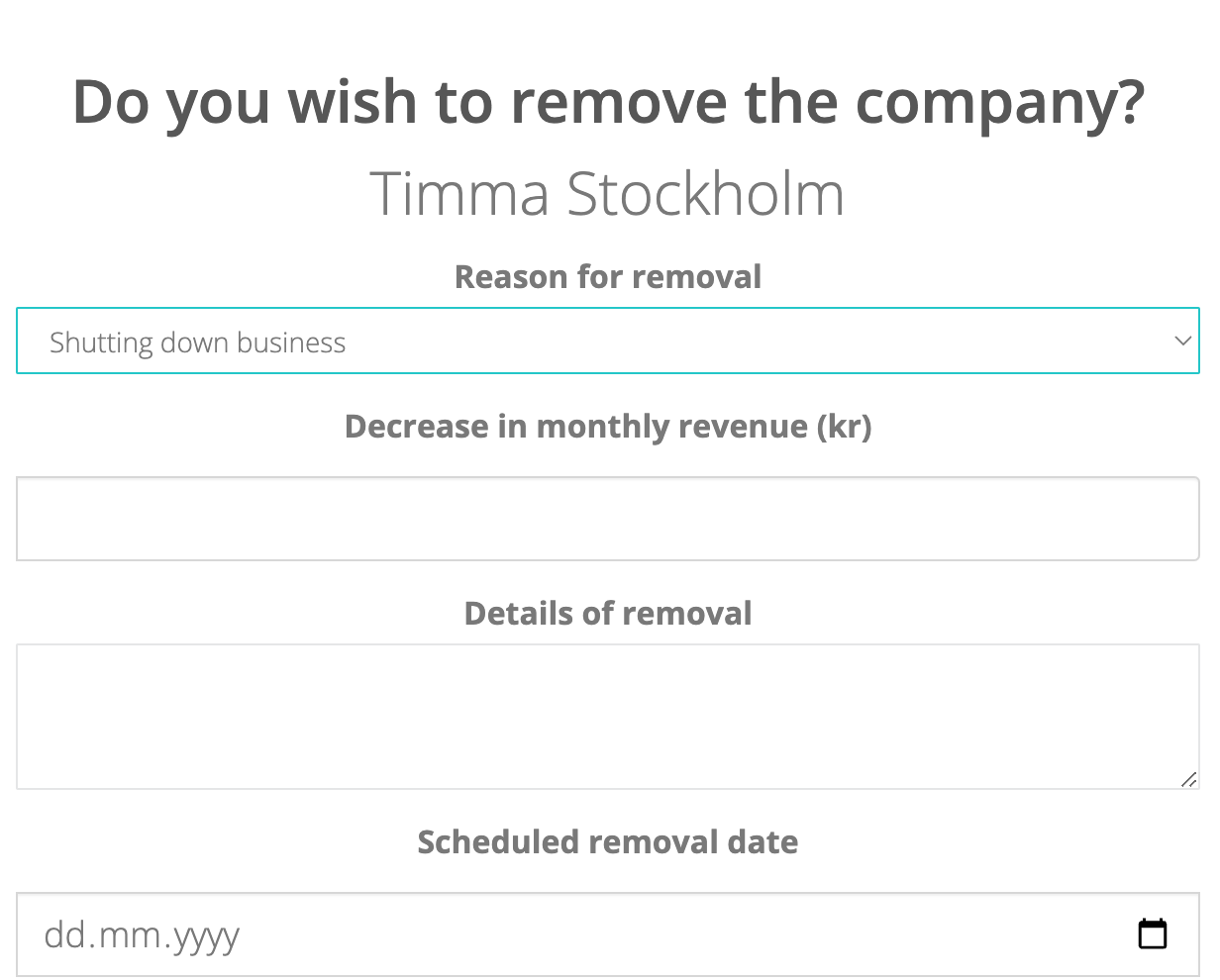
Step 7.3: Fill in the missing fields
Step 7.4: If salon was part of chain, and after removing it, the chain will only have one salon - remember to unchain that one salon. This is important as otherwise they will have wrong UI and we will have wrong data on chains.
FAQ
- What shall I do if the salon has been sold?
- The main user needs to send an email to CuHa with a transfer of contract and detailing who is going to take over the contract ( info such as name, phone number, email, organization number and start date).
What if a rental chair wants to terminate their contract with Timma?
Then the rental chair needs to email us with further information such as: Organization number, end date for billings, name of the salon they work at and name of their own company.
Troubleshooting
What should you do if there are disagreements in the salon. e.g. if main user doesn’t want to give customer register to rental chair
If the main user do not want to give the customer register to the rental chair you should do the following:
- Go to the tab More and Contracts
- Check if the rental chair is added as a Partial owner, if yes continue with next step. If no go to step
- If the rental chair is marked as a Partial owner that means he/she owns and administers the data of customers who are marked as his/her loyal customers. There can be multiple partial owners. With that said, the main user can not say that the rental chair is not allowed to download the register.
- If the rental chair is not added as a Partial owner under the Contracts page, the rental chair has to talk to the salon owner ( main user) to solve the problem. Legally the salon owns the whole customer register and can therefore decline the rental chair. Timma as a company will not mediate between the owner and rental chair since we are only a system that the salons use. If one of the parties insist that we should mediate contact your customer success lead who can help you with this!