Turnover rent is the net rent that is determined according to the turnover of the business carried out in the premises. The turnover rent can be determined, for example, in the following way: The minimum rent is x euros (the maximum rent can also be determined, if required). The rent is x percent of the turnover, but yet no less than the minimum rent and no more than the maximum rent. Here, ‘turnover’ is understood to mean net sales exclusive of taxes and adjustment items.
Updating turnover in the system
If turnover rent is used on an agreement, it is important that the customer’s turnover is always updated in the system before creating the invoicing data.
The Turnover update tool is found from the Inrent and Outrent menu, as illustrated below.
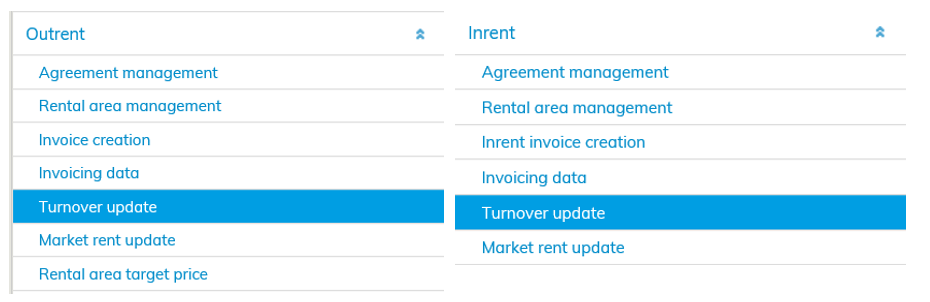
Use the Turnover update tool to enter turnover that affects the agreement into the system.
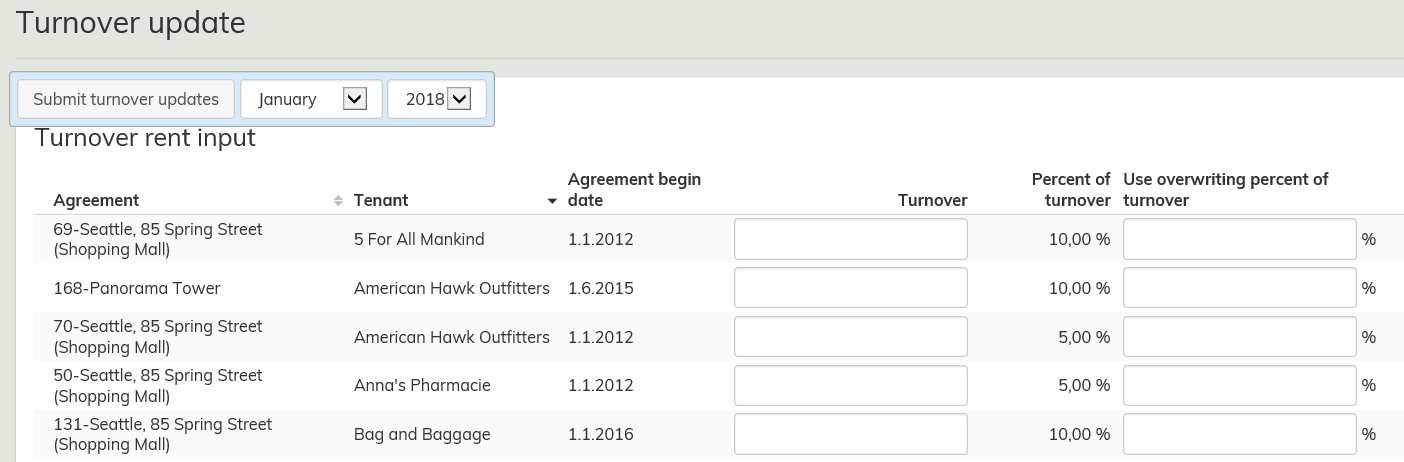
In the upper left corner, select the month and year for which you are entering turnover. Then enter the turnover on the relevant line.
If that month’s percentage of turnover differs from that defined in the agreement, enter the differing percentage.
For instance, if the agreement states that the turnover to be used for invoicing is the turnover 2 months before the due date of the invoice, an invoice raised on 1 January 2018 must be based on turnover at 1 November 2017.
Turnover data for several agreements may be entered at the same time for the same month. Enter the turnover on all agreements for the month in question.
Once you have entered the required data, select Submit turnover updates.
Entering turnover rent on an agreement
Turnover rent is determined by comparing the turnover component to the base rent or by adding it to the base rent.
Enter the percent of turnover required, and if needed, the maximum amount for the turnover rent (you can determine a separate rent adjustment for this).
The turnover to be used for each invoicing period must be specified. For instance, this may be the turnover x months before the due date of the invoice, or the last turnover entered.
Example: The base rent for the rental areas is EUR 10,000 per month. The turnover rent is determined as follows: The turnover rent is compared to the base rent. The percentage is set at 10% of the turnover. Maximum turnover rent is set at EUR 20,000 per month, with rent increase according to the agreement. When invoicing, the base rent is compared to the turnover 2 months before the invoicing period, i.e. the turnover for May is used for July’s invoicing. If the turnover for May is EUR 150,000, 10% of this is EUR 15,000. As this percentage exceeds the base rent of EUR 10,000, it will be used in invoicing.
Instructions for entering turnover rent on an agreement can be found in section Turnover rent.
