Basic information on the properties and buildings is maintained in the property and building register.
Select Registers from the main menu, then choose Property and building register. A tree structure of the real estate hierarchy is opened to replace the menu.
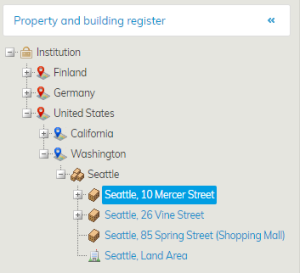
From the tree structure, select a property or building whose data you want to view.
Information on the selected property is opened in the workspace.
The icon of the property includes a building and a piece of land. When you click the name of the property, the Basic data tab of the property will open up.

By clicking the Documents and Map tabs written in blue, you can access the information in those tabs. The property data can be configured, and thus, they vary according to the customer.
A square depicting a house is used as the icon for the building. By clicking the name of the building, you can access its information.

The information fields for buildings vary according to the customer, and they can be edited to better suit the customer’s needs.
The tabs Basic information, Area, Events, Drawings, Documents and Map are available for everyone.
| Tip |
|---|
The information in the Code field is updated automatically also to the Object management. Based on the entry in the Code field, the financial information will be allocated to the right property during finance processing. |
Kiinteistö- ja rakennusrekisterissä ylläpidetään kiinteistöjen ja rakennusten perustietoja.
Valitse päävalikon Rekisterit kohdasta Kiinteistö- ja rakennusrekisteri, jolloin valikon paikalle avautuu kohdehierarkia puumaiseen muotoon.
...
Työikkunaan avautuu valitun kohteen tiedot.
Kiinteistön kuvakkeena on rakennus maa-alalla. Kun painat kiinteistön nimeä, avautuu kiinteistön Perustiedot välilehti.
Painamalla sinisellä tekstillä olevia Dokumentit ja Kartta välilehtiä, pääse tarkastelemaan niiden välilehtien tietoja. Kiinteistöjen tiedot ovat konfiguroitavissa ja siksi vaihtelevat asiakkaittain.
Rakennuksen kuvakkeena on taloa kuvaava neliö, rakennuksen nimeä painamalla pääset tarkastelemaan rakennuksen tietoja.
...
Perustiedot, Laajuustiedot, Tapahtumat, Piirustukset, Dokumentit ja Kartta -välilehdet löytyvät kaikilta.