...
On the right-hand side of the basic information page, you can find various function buttons.
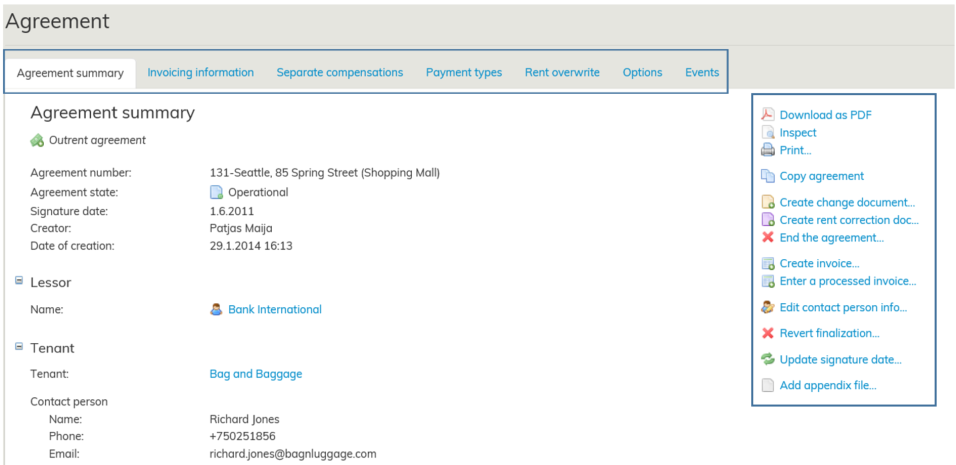
Sopimuksen välilehdistä ja sopimuslomakkeen toimintopainikkeista on erilliset ohjeensa:
Sopimuksen tiedot - välilehdet ja Sopimuksen tiedot - työkalut.
Yllä kuvassa oleva sopimus on hyväksytty ja Voimassa-tilassa. Sopimus on voimassa tilassa sen voimassaoloaikana.
Jos sopimus on hyväksytty, mutta se alkaa vasta esim. seuraavan kuukauden alussa on sopimuksen tila silloin Alkava.
Vastaavasti päättyneiden sopimuksien tila on Päättynyt.
For separate instructions on the tabs and function buttons in the agreement summary page, see the sections
Agreement information – tabs and Agreement information – tools.
The agreement illustrated above has been accepted and its state is Operational. The agreement state can be Operational only during the validity of the agreement.
If an agreement is accepted but begins only at the start of the next month, the agreement state is Beginning.
Similarly, expired agreements are in the Terminated state.
You can view agreement information of beginning, operational and terminated agreements on reports in the lease management either individually or as a groupAlkavien, voimassaolevien ja päättyneiden sopimuksien tietoja voit tarkastella, yksittäisen sopimuksen perustietojen lisäksi, kootusti vuokrauksenhallinnan raporteilla.
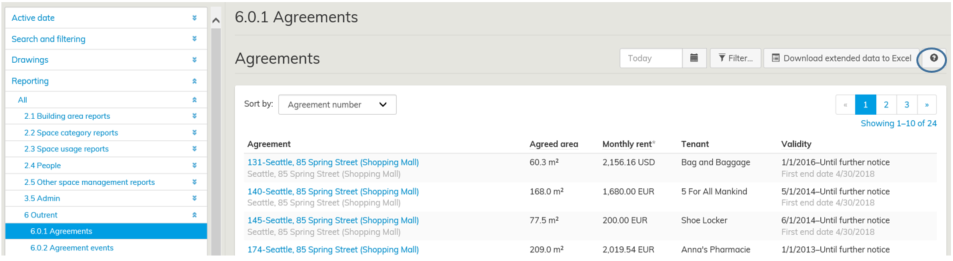
Raportoinnin tarkempi ohje löytyy raporit näkymän oikean reunan kysymysmerkin takaa Optimazesta.
...