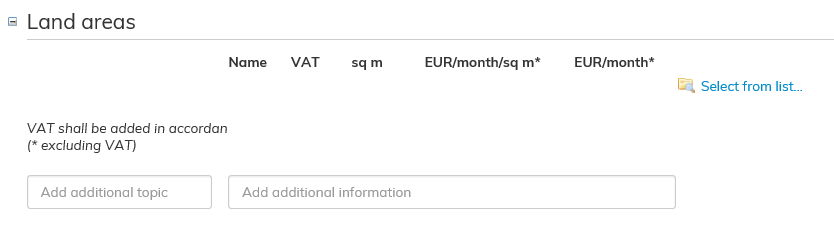
Lisää maa-alue, jonka haluat lisätä vuokrasopimukseen. Paina Maa-alueet kohdan oikealla reunalla olevaa sinistä tekstiä Valitse listasta...
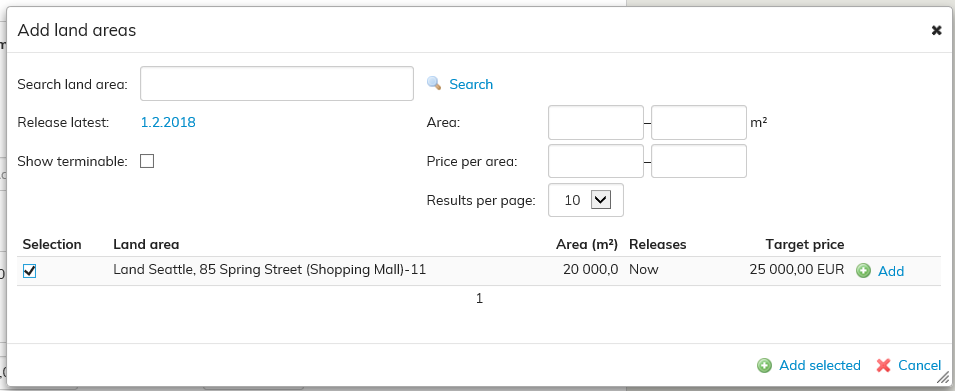
Näytölle avautuu Lisää maa-alueita -ikkuna.
Voit hakea maa-alueita nimen, vapautumisen tai irtisanomisen perusteella. Valitse lisättävät maa-alueet ja valitse Lisää valitut.
Add the land area that you wish to add to the lease agreement. Click on the blue Select from list... on the right-hand side next to the Land areas field.
Add land areas will open up.
You can search for a land area either by its name, or by the ending or termination date of the agreement. Select the appropriate land areas and click Add selected.
If a land area included in the agreement has not been added in Optimaze, you can add it according to the instructions given under Land areas section in Rental area managementMikäli sopimukseen kuuluvaa maa-aluetta ei ole lisätty Optimazeen, voi käydä lisäämässä sen Vuokra-alueiden hallinta -kohdassa olevan Maa-alue -ohjeen mukaan.