Any changes to accepted agreements are primarily made with a change document. For instance, if you want to add or delete single rental areas or change the rent period, you need to create a special change document.
For instance, if you want to add or delete single rental areas or change agreement terms (like the rent period or rent adjustment terms), you need to create a special change document for the agreement.
Select Create change document or Create rent correction doc on the right of the agreement summary page. You can use the rent correction document to change terms related to rent, or the rent itself. The details relating to rent adjustments agreed upon in the agreement are not included.
For instructions on creating the change document, see the section Change document and Rent correction document.
| Note! |
|---|
Create a change document, when an actual change to the agreement is needed. When using a change document, original information on the agreement,as well as the agreement history, can be stored. If you make changes to an agreement by reverting its finalization, the original information will be lost, as it is overwritten with new information. |
Editing an agreement
You can also edit an agreement that has already been signed and accepted.
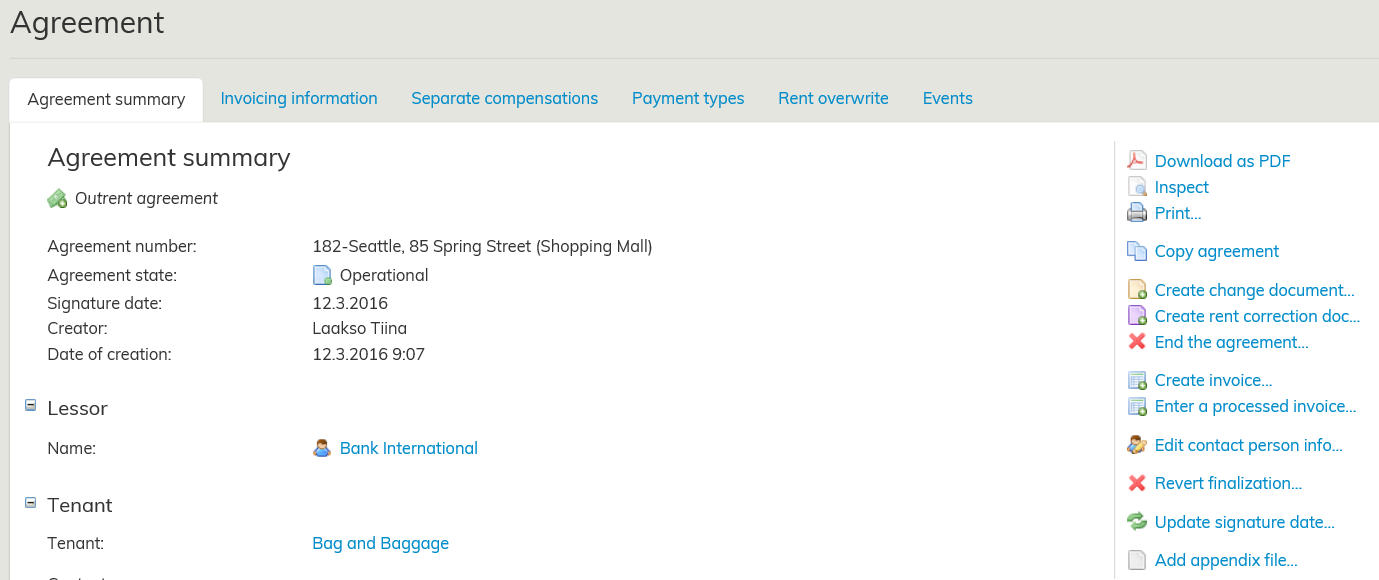
You can also edit accepted and signed agreements to correct faults. In this case, select Revert finalization on the right. If you revert the finalization of an agreement, its history information will be lost. Use this function carefully.
The signature date can be edited by selecting Update signature date on the right and by entering the correct date in Agreement signature date field.
You can also edit an agreement that has already been signed and accepted.
Select Create change document or Create rent correction doc on the right of the agreement summary page.
You can use the rent correction document to change terms related to rent, or the rent itself. The details relating to rent adjustments agreed upon in the agreement are not included. The change document is used to change other terms relating to rent, except the rent itself.
You can also edit accepted and signed agreements to correct faults. Select Revert finalization on the right, after which the agreement is reverted back to an editable draft
Hyväksyttyä ja allekirjoitettua sopimusta voidaan myös muokata. Jos haluat esimerkiksi lisätä tai poistaa yksittäisiä vuokra-alueita tai muuttaa vuokra-aikaa, tulee sopimukselle luoda erillinen muutosasiakirja.
Valitse sopimuksen koontilomakkeen oikeasta reunasta Luo muutosasiakirja tai Luo vuokramuutosasiakirja.
Vuokramuutosasiakirjalla voit muuttaa vuokraan liiittyviä ehtoja tai itse vuokraa, joka ei liity sopimuksella sovittuun vuokrantarkistukseen. Muutosasiakirjalla muutetaan muita sopimuksen ehtoja kuin vuokraa.
Hyväksyttyä sopimusta voi muokata virheiden korjaamista varten. Valitse oikean reunan Peruuta hyväksyntä painikkeella, tämän jälkeen sopimus palaa luonnostilaan, jota voit muokata.
Muutokset hyväksyttyihin sopimuksiin tehdään pääasiassa muutosasiakirjalla.
...
Muutosasiakirja luodaan kun sopimuksella tapahtuu tosiasiallisesti muutos. Muutosasiakirja mahdollistaa sopimusten alkuperäisten tietojen ja historiatietojen säilymisen.
Jos teet sopimukselle muutoksia peruuttamalla sopimuksen hyväksynnän, häviävät käytöstäsi alkuperäiset tiedot ja ne ylikirjoitetaan uusilla tiedoilla.
Sopimuksen muokkaaminen
Hyväksyttyä ja allekirjoitettua sopimusta voidaan myös muokata.
Muutokset hyväksyttyihin sopimuksiin tehdään pääasiassa muutosasiakirjan kautta. Katso ohje muutosasiakirjan tekemiseen kohdasta Muutosasiakirja ja vuokramuutosasiakirja.
Jos haluat esimerkiksi lisätä tai poistaa yksittäisiä vuokra-alueita tai muuttaa vuokraehtoja kuten vuokra-aikaa tai vuokrantarkistusehtoja, tulee sopimukselle luoda erillinen muutosasiakirja.
Valitse sopimuksen koontilomakkeen oikeasta reunasta Luo muutosasiakirja tai Luo vuokramuutosasiakirja -painike. Vuokramuutosasiakirjalla voit muuttaa vuokraan liittyviä ehtoja tai itse vuokraa, joka ei liity sopimuksella sovittuun vuokrantarkistukseen.
Hyväksyttyä sopimusta voi muokata virheiden korjaamista varten. Valitse oikeasta reunasta silloin Peruuta hyväksyntä -painike. Jos peruutat sopimuksen hyväksynnän ei sopimuksen historiatieto säily, joten käytä tätä toimintoa harkiten.
...
.