This Lease management guide is meant for solution that is inside Moment. If you are using Lease -application as your Lease management system, you can find the guide here: Lease user guide
Instructions on lease management covers both inrent and outrent. In general, the inrent and outrent functions work similarly in Optimaze. Creating invoicing information takes place on the outrent side, while the material handled on the inrent side belongs to the invoicing process. In addition, the outrent covers also the preparation of offers, which is not included on the inrent side.
...
The term ‘rental area’, as well as rental area management, are described in detail in the instructions on the rental Rental area management.
ta.
| Tip |
|---|
Various icons are used in lease management, and understanding their meaning helps in using the software. The icons used in lease management and their descriptions are listed below |
...
Filtering lets you find information more quickly and more efficiently, with more accurate search results. The selected information to be filtered affects all the data and reporting found in the system. You can find more detailed instructions on using these functions under Search and Filteringfiltering.
| Tip |
|---|
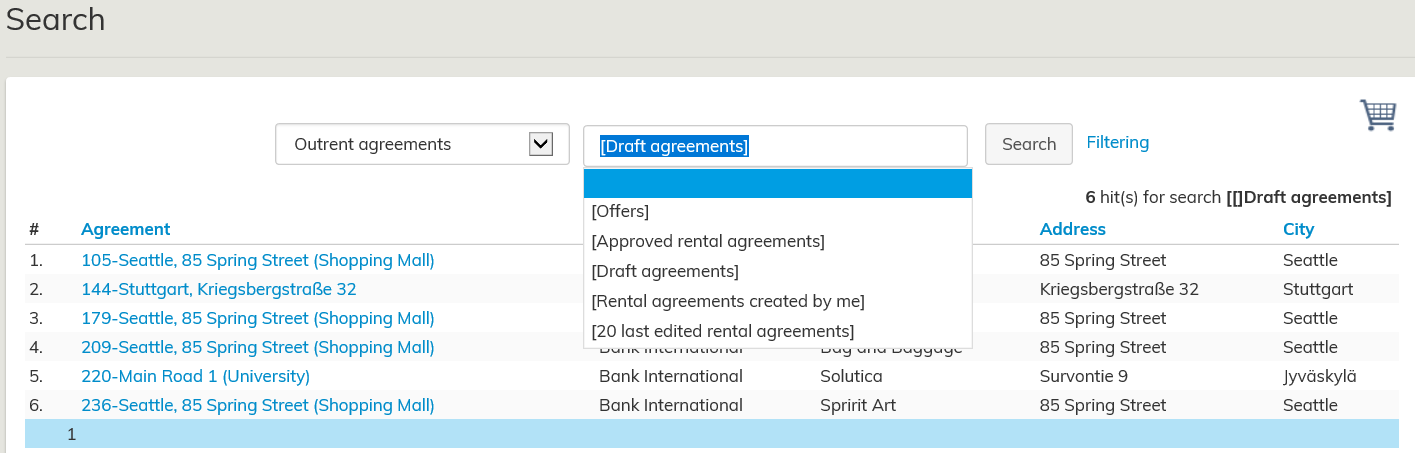
With the Search function, you can also search for draft agreements that include data that is not displayed in any other lease management report.
When you search outrent or inrent agreements, the text Draft agreements appears in the pull-down menu. By clicking it, a list of draft agreements in Optimize opens |
...