...
In the virtual space register, you can see the virtual space data created, and add and edit certain features.

By selecting Registers and then Virtual floor register from the main menu, a register menu is opened in the workspace.Browse register window will open.
You can find detaled instruction of the function in Property and building register instruction

You can create and manage virtual spaces by selecting Virtual space register. 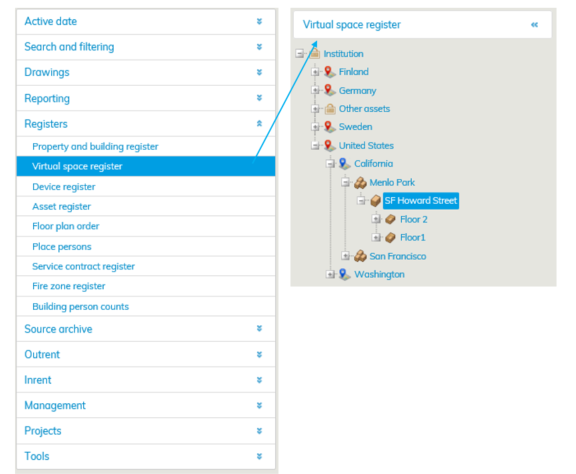 If you want to create a virtual space, select the building in the list or from the register tree.
Click Add virtual floor -button

If the building is not in the register tree, you can create a building under the selected property by clicking Add building button.
...
Instructions on floor plans can be found under Help in the menu on the upper right corner of the floor plan browser.
Muutokset virtuaalirekisterin tietoihin
Mikäli virtuaalitilaan tulee muutoksia, joudutaan tilalle tekemään uusi Virtuaalitila. Tiloille ei voida määrittää päättymispäivämäärä muulloin kuin tilojen luomishetkellä.
Virtuaalitila/kerros on mahdollista vain poistaa kokonaisuudessaan. Poista virtuaalitila -painikkeella poistat kyseisen Virtuaalitilan, Poista kerros -painikkeella poistat koko kerroksen ja kaikki siinä olevat Virtuaalitilat.
Virtuaalikerroksien piirustuksilla ei ole revisioita. Virtuaalikerrosten tilat saavat alkamis- ja loppumispäivät rakennuksen voimassaolopäivämääristä.
Changes to the information in the virtual space register
If the virtual spaces need to have changes, a new virtual space must be created. You can define an end date for the space only when creating the space.
You cannot delete a virtual space or virtual floor partially; you must delete the whole space or floor. Remove virtual space button will delete the selected virtual space, and Delete floor button will delete the whole floor including all the virtual spaces it contains.
There are no revisions for drawings of virtual floors. The starting and end dates for virtual floor spaces are obtained from the starting and end dates for the building.
If you end the building, the spaces will also end. If you add spaces to virtual floors later, they will have the same starting and end dates as the spaces that have been entered beforeJos rakennus päätetään, niin myös tilat päättyvät. Jos virtuaalikerroksiin lisätään myöhemmin tiloja, saavat ne samat alkamis- ja loppumispäivät kuin aikaisemmatkin tilat.