The virtual space register can show floors and spaces in properties that have no floor plans available.
You can maintain, manage and update the virtual space data with the virtual space register.
In the virtual space register, you can see the virtual space data created, and add and edit certain features.
By selecting Registers from the main menu, a register menu is opened in the workspace.
You can create and manage virtual spaces by selecting Virtual space register.
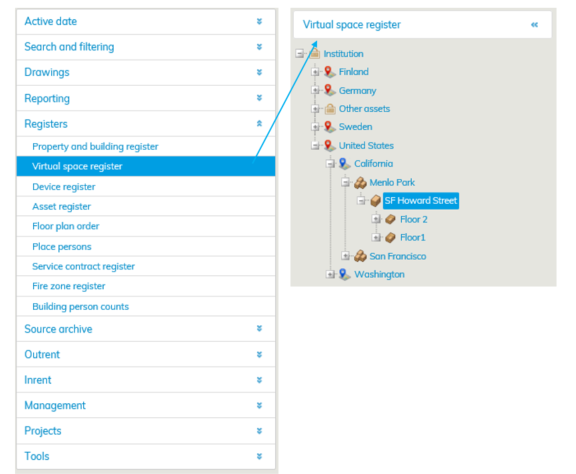
If you want to create a virtual space, select the building from the register tree.

If the building is not in the register tree, you can create a building under the selected property by clicking Add building button.
If you are creating a new building, enter the MasterName and Customer name.
The building in question is found under the MasterName from Rapal’s Master database.
It is recommended that you use the name of your organization (found in the top bar of Optimaze next to your name) and the building as the MasterName, so that you can easily find the building from the real estate hierarchy.

Here, the MasterName is DEMO ENG_Vantaa, Rental, because the building is in the DEMO ENG database and located at Hallituskatu 21 in Espoo. The Customer name is the MasterName without the database name. Then, enter the Code (accounting number, if you wish to allocate costs to the building) and the Begin date and determine, whether the property is budgeted or not. Select Save.
Then, enter the floor and give a descriptive name for it. Save.

After this, you need to add a virtual space or multiple virtual spaces for the floor.
Click Add virtual space button.

Anna virtuaalitilalle tarvittavat tiedot; Tilan nro, Huoneala/Huoneistoala ja Työpisteiden lkm.
Valitse alasvetovalikosta Yhteistilankoodi sekä Tilaluokka. Lopuksi Tallenna tiedot.
Virtuaalitilat tallentuvat tietokantaan.
| Vihje |
|---|
Kun virtuaalitilan neliömäärä on vähintään 1m2, näkyy se pohjakuvassa. Alle neliön virtuaalitiloja ei voida näyttää. |
Virtuaalitilojen Piirustukset käyttäytyvät piirustussovelluksessa samoin kun Masterista tuodut piirustukset, paitsi niillä ei ole revisiota.
Pääset Virtuaalitilaan samoin kuin muihinkin pohjakuviin piirustuspuusta tai haku-toiminnolla.
Kun Virtuaalitilojen piirustuksen avaa, järjestelmä generoi tiloille pinta-alojen mukaiset suorakulmiot, jotka näkyvät piirustuksessa.

Voit muokata virtuaalitilojen tietoja samoin kuin muidenkin tilojen tietoja pohjakuvaselaimella.
Tiloille voidaan lisätä tietoja kuin normaalille tilalle esim. kustannuspaikka, tilanumero. Samoin väritykset, tekstitykset ja muut piirustus-toiminnot ovat käytettävissä kuin normaaleissa piirustuksissa.
Pohjakuvan ohjeistus löytyy pohjakuvaselaimen oikean yläkulman Valikko otsikon alla olevan Ohje-painikkeen takaa.
Muutokset virtuaalirekisterin tietoihin
Mikäli virtuaalitilaan tulee muutoksia, joudutaan tilalle tekemään uusi Virtuaalitila. Tiloille ei voida määrittää päättymispäivämäärä muulloin kuin tilojen luomishetkellä.
Virtuaalitila/kerros on mahdollista vain poistaa kokonaisuudessaan. Poista virtuaalitila -painikkeella poistat kyseisen Virtuaalitilan, Poista kerros -painikkeella poistat koko kerroksen ja kaikki siinä olevat Virtuaalitilat.
Virtuaalikerroksien piirustuksilla ei ole revisioita. Virtuaalikerrosten tilat saavat alkamis- ja loppumispäivät rakennuksen voimassaolopäivämääristä.
Jos rakennus päätetään, niin myös tilat päättyvät. Jos virtuaalikerroksiin lisätään myöhemmin tiloja, saavat ne samat alkamis- ja loppumispäivät kuin aikaisemmatkin tilat.
