The user guide can be found in the main menu under Tools. By clicking on Help, you a directed to this site.
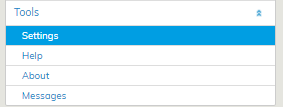
You can find the user guide in PDF format for printing at the root of this user guide site. You can print the guide or save it to your computer.
Because most functions in Optimaze Moment are customized, the most common cases, reports and information are described in this user guide.
Instructions for financial and environmental functions in the Eco view are given to customers when the application is taken into use.
