Real estate hierarchy
When the application is taken into use, the real estate hierarchy is determined based on the customer’s needs. Normally, the real estate hierarchy follows the geographical area.
The real estate hierarchy can also be determined based on other criteria. Outrented real estates and spaces in own use, for example, can be organized as separate branches in the real estate hierarchy.
The real estate hierarchy displayed in the Object management is also used for the Property and building register, as well as the tree-like list of drawings. Also the tree-like list of rental areas is following the organization in the real estate hierarchy.
In different levels of the real estate hierarchy, you can add different objects or delete and edit them. It is recommended to determine an end date for terminated objects. In this case, their information can be viewed by changing the date in Optimaze so that it falls within the operational period. In addition, financial information can be allocated for the operational
| Note! |
|---|
If you edit the objects, please note that the changes affect finance processing and reporting. If you delete an object from the real estate hierarchy, for example, its information cannot be reported in Optimaze, and you cannot allocate costs for it. It is recommended to delete objects only when the object has never actually existed. |
Active functions are always shown in blue under the properties.
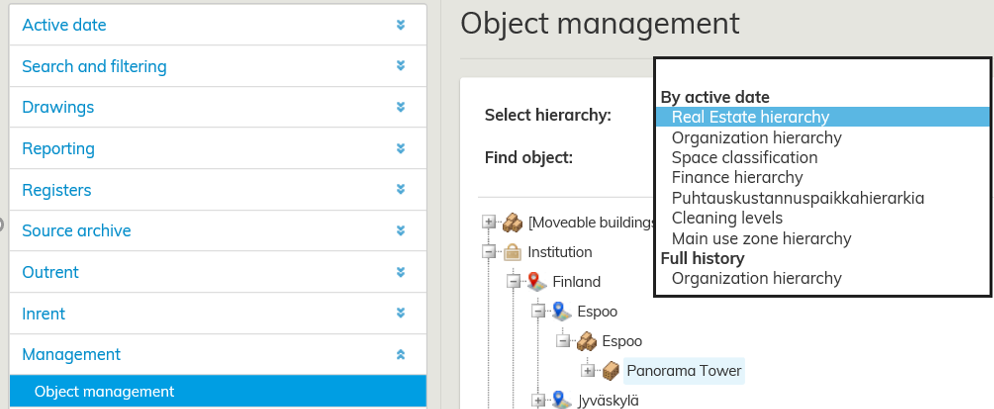
Management of real estate hierarchy
In all levels, you can delete objects by selecting Remove object and its space links.
If the object has child objects, it cannot be deleted. In this case, a text Object cannot be removed because it has child objects appears in gray.
In real estate hierarchy, you can also edit or add object properties, such as building codes, names and begin/end dates, as well as define the budgeting status (No, Yes, Always valid).
